
ACHIEVE MORE WITH ATAS FOR EARN2TRADE
Get a free ATAS license and start your challenge
Registration
Get a free ATAS license and start your challenge

1. Register your ATAS account by filling out the form above
2. Download and install classic ATAS for Windows or new ultra fast ATAS X (Beta) for Windows & macOS
3. Launch the software using the login and password received by email after registration
4. Connect Earn2Trade account. No account opened? You can register it here
5. Evaluate your trading and get a funded account
More detailed instructions for ATAS installation you can find in our Knowledge Base.
If you already have an ATAS account, use the same login credentials. If you don’t have an account and are signing up with a new email address, use the credentials you receive via email.
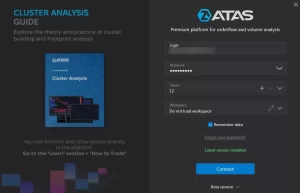
1. In the ATAS login menu, enter your username and password.
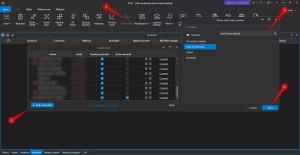
2. To connect the account, click Connections in the main window, then click Add. In the next window, select Earn2Trade dxFeed and click Next.
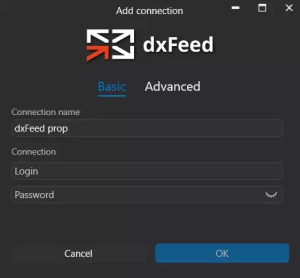
If you already have a license, you should use a dxFeed Prop connection.
3. Enter the login and password for your Earn2Trade account.
Use the login and password provided by Earn2Trade. Your atas.net credentials will not work here.
Environment – connection environment. Select Production for regular use; Staging is for testing.
Login – your trading account login.
Password – your trading account password.
Connection name – any convenient name for this connection in ATAS.
Portfolio name – any convenient name for this connection in ATAS.
Use limited order book – uses the limited dxFeed order book when supported. Recommended to keep enabled.
Levels count – maximum number of order book levels on each side. 0 displays all available levels.
4. Click Finish.
After configuring the connection, it will appear as a separate line in the list of connections.
You can read more about the settings of this window here: Connection Settings Window.
You can use the ATAS license with all Earn2Trade challenges. This license can’t be used for Live Trading
Yes, you can use the ATAS license with SIM-funded accounts.
DISCLAIMER: ATAS develops financial market analytics software. The company does not provide trading signals, financial or investment recommendations, is not a broker/dealer/exchange, does not accept client funds, and does not perform operations with assets. Charts, indicators, historical examples, and descriptions of ATAS functions are for informational purposes only. They are neither individualized recommendations nor guarantees of financial results. Past performance does not guarantee future results. Users connect to third-party brokers/exchanges at their own discretion. Service conditions, rates, and commissions are determined by respective providers. ATAS does not control order execution, connection quality, quotes, or other third-party data, and is not responsible for any resulting delays, inaccuracies, or failures. Users make trading decisions independently and bear full responsibility for all associated risks, including the possibility of partial or complete loss of invested funds.
ATAS LLC., 1 Katlakalna street, Riga, Latvia. Registration No.: 40203154738