
ACHIEVE MORE WITH ATAS FOR WSFUTURES
Get a free ATAS license and start your challenge
Registration
Get a free ATAS license and start your challenge

1. Register your ATAS account by filling out the form above
2. Download and install classic ATAS for Windows or new ultra fast ATAS X (Beta) for Windows & macOS
3. Launch the software using the login and password received by email after registration
4. Connect WSFutures account. No account opened? You can register it here
5. Evaluate your trading and get a funded account
More detailed instructions for ATAS installation you can find in our Knowledge Base.
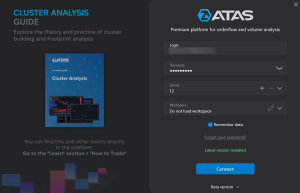
First, you should start ATAS to connect your WSFutures account.
On the Authorization window, enter your login and password received by email after registration in the form above.
If you already have an ATAS account, use your common credentials.
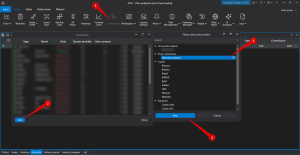
To connect your account, click on the « Connections » button (1) in the main menu, then click the « Add » button (2).
On the next window, select Rithmic (3) as the data provider for your WSFutures account, and click « Next » (4).
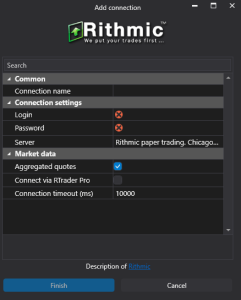
Enter your login and password provided by WSFutures and click « Finish ».
⚠️ When connecting, it is important to select the Rithmic Paper Trading server.
If you do not have a WSFutures account yet – you can open it by filling the form above.
If you already have a license, you should use a Rithmic connection and select the Rithmic Paper Trading server.
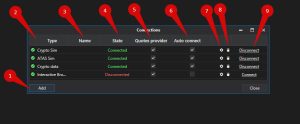
After configuring the connection, it will appear as a separate line in the list of connections.
You can read more about the settings of this window here: Connection Settings Window.
If you want to connect your account automatically every time you start ATAS, check the box under the « Auto connect » column and click the « Connect » button.
All set. Your WSFutures account is now connected, and you can start your evaluation!
You can use the ATAS license with all WSFutures challenges. This license can’t be used for Live trading.
Yes, you can use the ATAS license with SIM funded accounts.
DISCLAIMER: ATAS develops financial market analytics software. The company does not provide trading signals, financial or investment recommendations, is not a broker/dealer/exchange, does not accept client funds, and does not perform operations with assets. Charts, indicators, historical examples, and descriptions of ATAS functions are for informational purposes only. They are neither individualized recommendations nor guarantees of financial results. Past performance does not guarantee future results. Users connect to third-party brokers/exchanges at their own discretion. Service conditions, rates, and commissions are determined by respective providers. ATAS does not control order execution, connection quality, quotes, or other third-party data, and is not responsible for any resulting delays, inaccuracies, or failures. Users make trading decisions independently and bear full responsibility for all associated risks, including the possibility of partial or complete loss of invested funds.
ATAS LLC., 1 Katlakalna street, Riga, Latvia. Registration No.: 40203154738