Footprint Charts:
What Drives Price Movement

See what happens inside each candle: actual volumes and the initiative of buyers and sellers at every price level
Try for free

What is a Footprint
in Trading

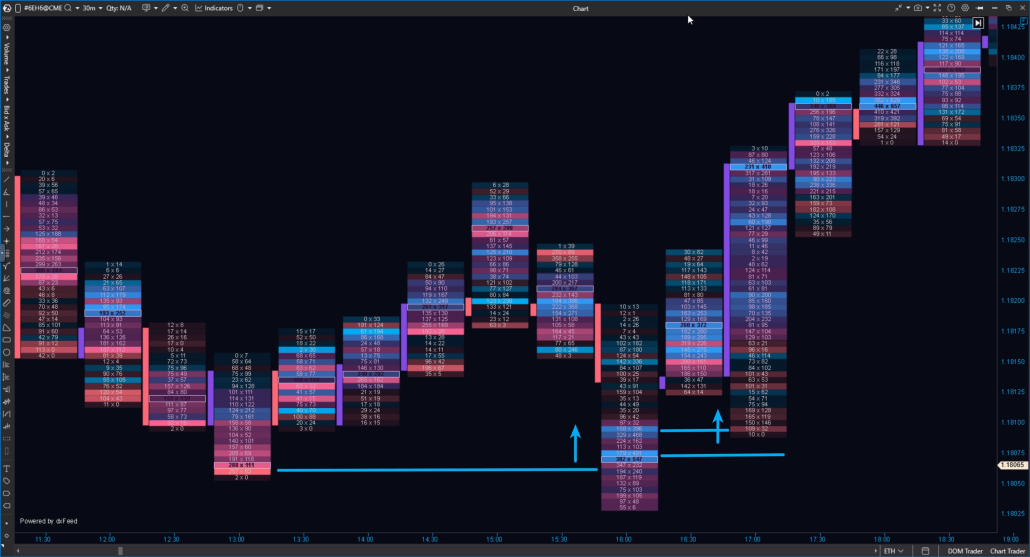
Footprint analytics is the foundation of volume analysis — a specialized chart that reveals how buy and sell orders are distributed at each price level.

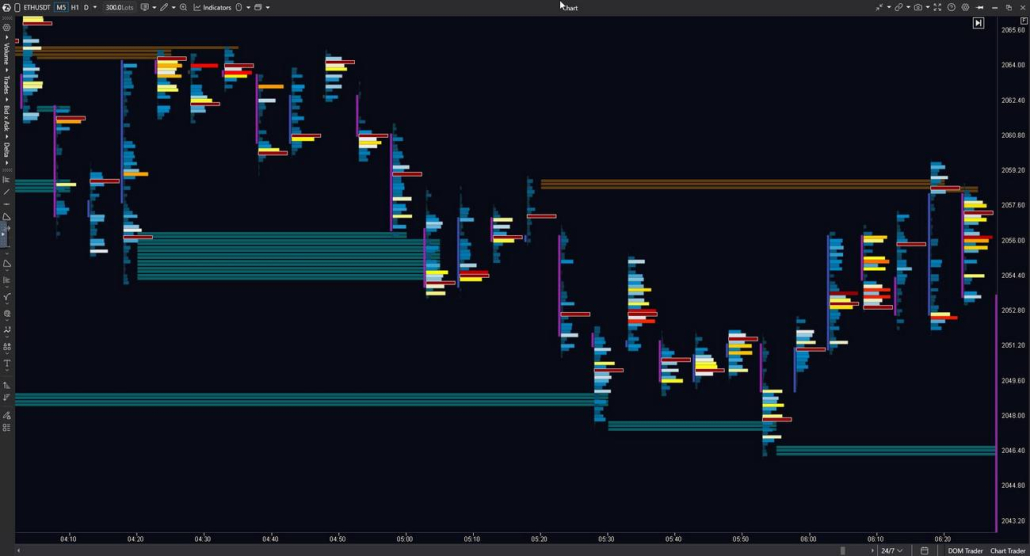
While classic candlestick charts only show price direction. The Footprint, however, breaks down each candle into individual price levels and shows the detailed processes behind this movement:

  • how many trades occurred at each level;
  • where maximum and minimum volumes are concentrated;
  • who took the initiative — buyers or sellers;
  • whether the price encounters signs of support or resistance.

ATAS is specialized footprint chart software that makes the market transparent. Footprint charts display market structure in detail, allowing you to analyze price movement based on actual data rather than visual assumptions.

How Footprint Chart
Is Built

ATAS uses tick-by-tick exchange data to build footprint charts. This data includes the price, volume, and execution direction of each trade.
The information comes directly from exchanges and market data providers. It’s aggregated by price levels within each candle as numerical clusters.

You get:
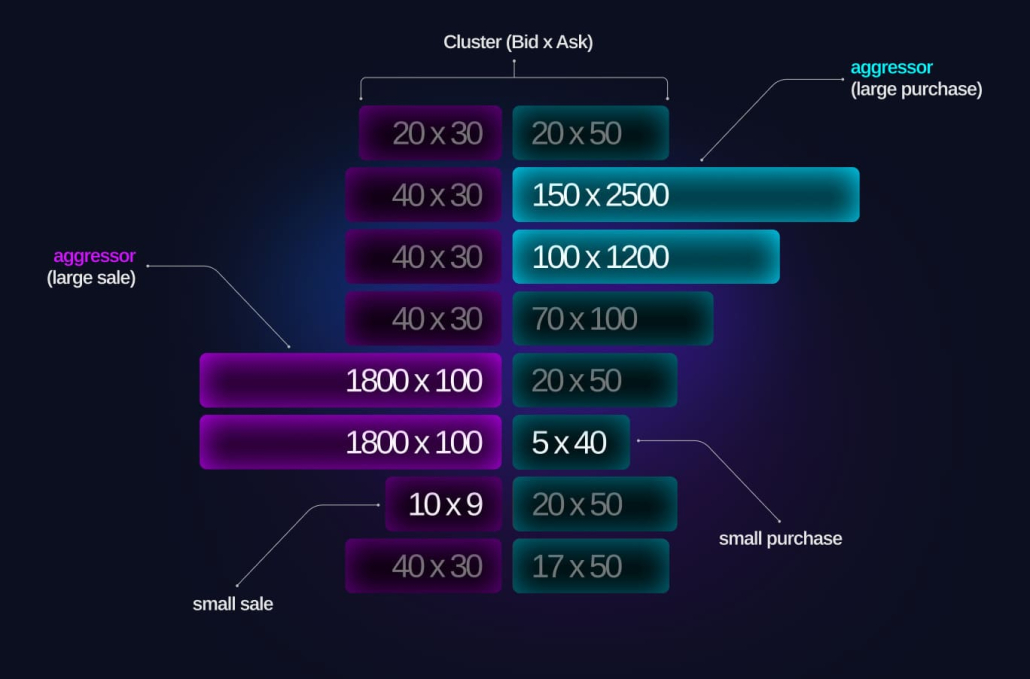
  • a detailed picture of buys and sells at each price level;
  • data on volume distribution across price levels, helping you identify where volume supports price movement and where it no longer confirms it;
  • a visual representation of buyer and seller initiative inside the candle.
Best Footprint Chart Software

On the left — market sell orders matched with limit buy orders. On the right — market buy orders matched with limit sell orders.

Types of Footprint

ATAS offers more than 400 footprint variations, positioning it among the best footprint chart software tools available.

The footprint type determines what data appears inside each candle: Volume, Trades, Bid × Ask, and Delta. Each type offers multiple visualization modes, letting you customize the chart to fit your specific analysis needs.
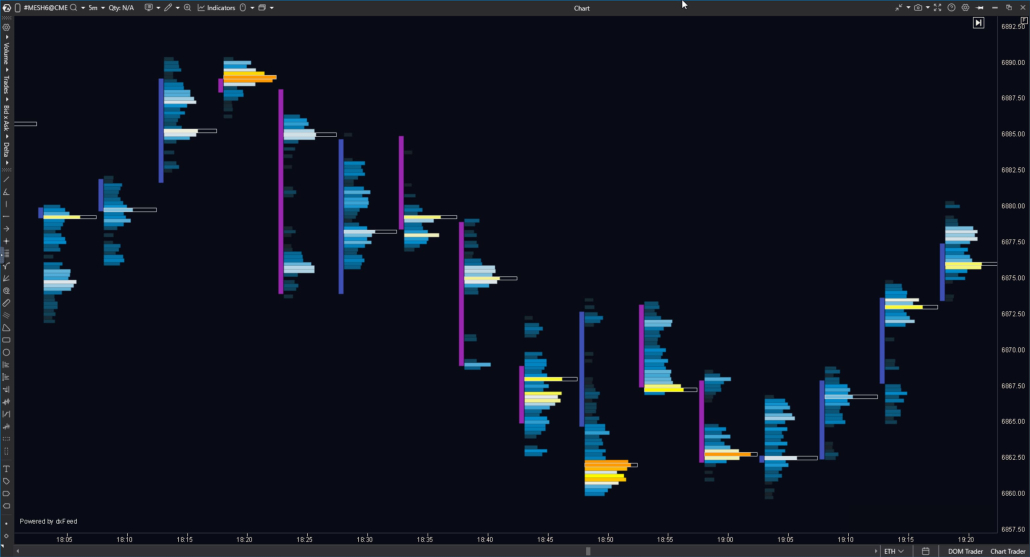
Volume Footprint Chart

Shows trade volume at each price level within the candle:

  • Volume footprint — quickly assess volume distribution across price levels;
  • Delta Colored Volume — see the imbalance between buying and selling at each level;
  • Volume Histogram — visually identify levels with increased volume concentration;
  • Volume Digital Histogram — clearly compare volumes between levels;
  • Delta Colored Volume Histogram — visually highlight levels with pronounced buying or selling pressure;
  • Volume × Trades — see both volume and number of trades at each level.

Trades Footprint Chart

Shows the number of trades executed at each price level within the candle:

  • Trades — to assess trading intensity at a given price level;
  • Delta Colored Trades — to see buyer or seller dominance based on the number of trades;
  • Trades Histogram — to visually highlight price levels with increased trading activity;
  • Trades Digital Histogram — to accurately compare the number of trades between levels;
  • Delta Colored Trades Histogram — to highlight levels with a pronounced buyer or seller dominance by trade count.

Bid x Ask Footprint Chart

Shows buy and sell volumes at each price level within the candle:

  • Bid × Ask — to see how buying and selling volume is distributed across price levels;
  • Bid × Ask Ladder — to highlight only the side with a delta dominance at each level;
  • Bid × Ask Delta Colored — to quickly assess buyer or seller dominance at a given level;
  • Bid × Ask Histogram — to visually highlight price levels with increased volume activity;
  • Bid × Ask Digital Histogram — to accurately compare buy and sell volumes between levels;
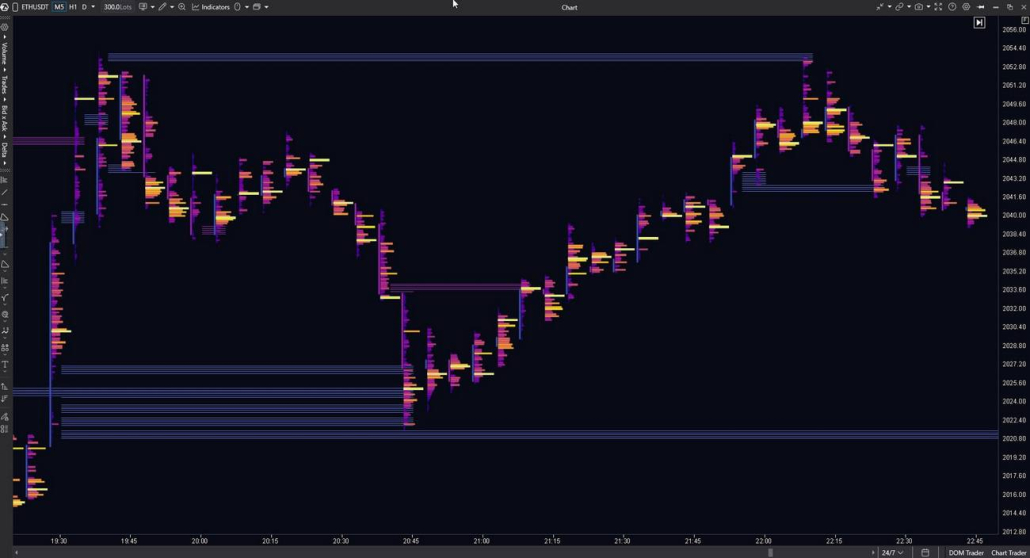
  • Bid × Ask Volume Profile — to analyze the volume profile with a separation between buying and selling;
  • Bid × Ask Delta Profile — to evaluate the delta distribution across price levels in a profile format.

Delta Footprint Chart
Delta Footprint Chart in ATAS

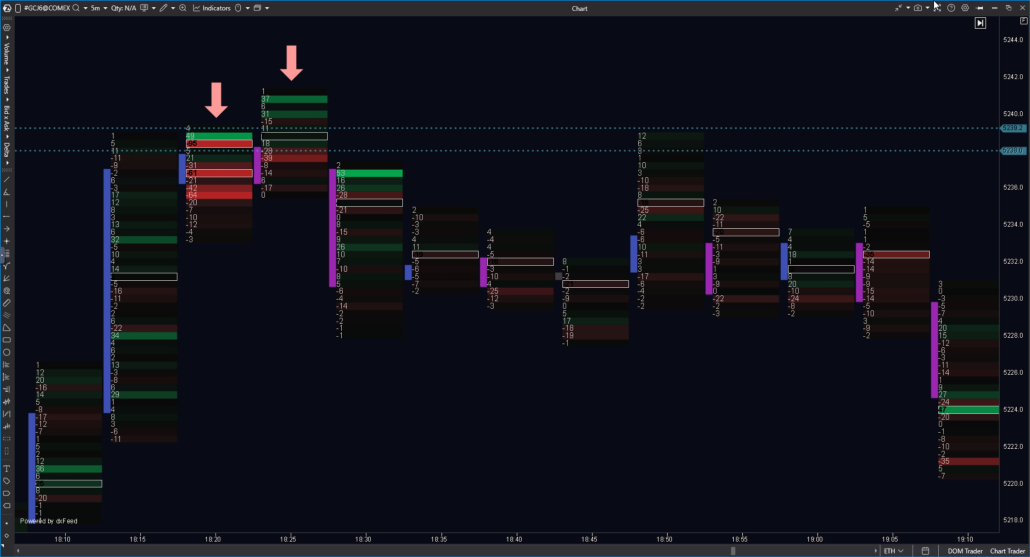
Shows the difference between buying and selling volumes at each price level within the candle — the core concept of a volume delta footprint:

  • Delta — to see which side dominated at a given price level;
  • Delta × Volume — to evaluate delta in the context of total traded volume at the level;
  • Profile — to analyze the distribution of delta across price levels in a histogram format.

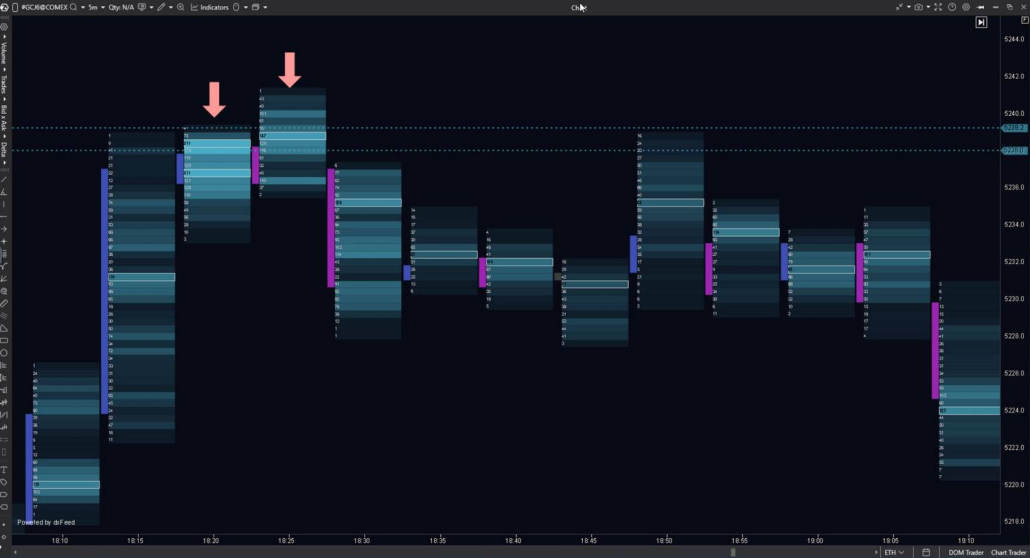
Heatmap Visualisation
Heatmap Visualisation Footprint Chart

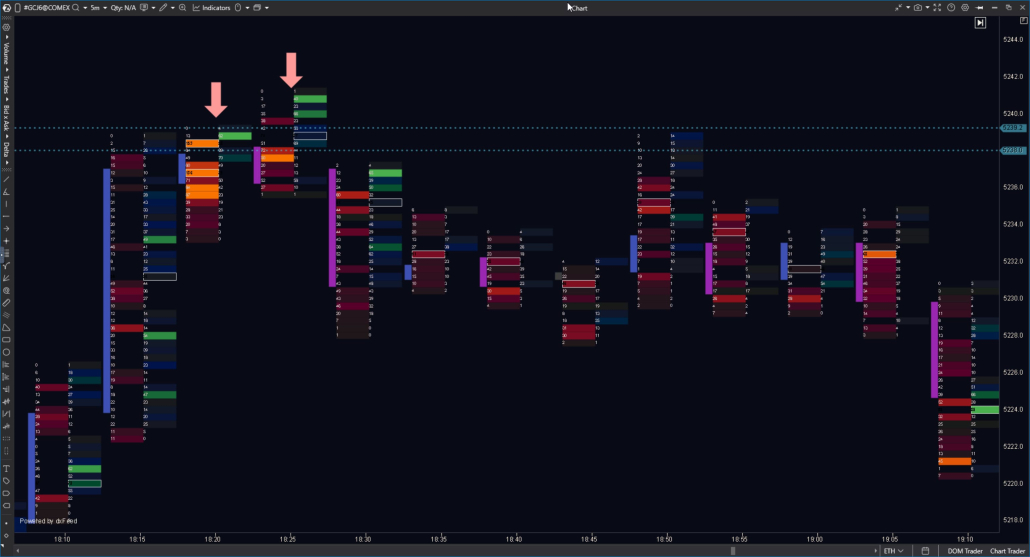
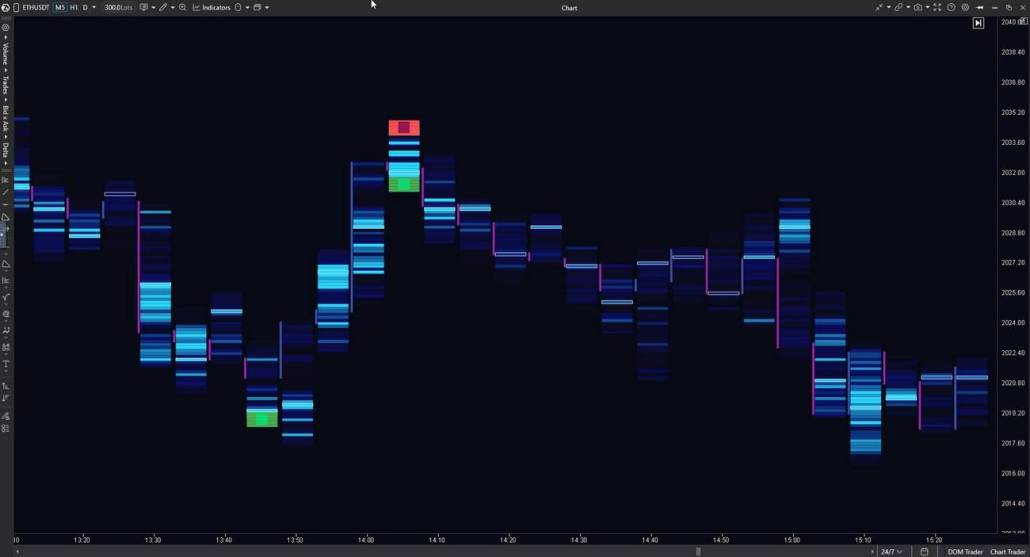
This visualization mode represents footprint data as a color-based map of market activity.
Color intensity reflects data concentration at each price level, making it easier to read market structure at a glance without focusing on numeric values.

  • By Volume — highlights volume distribution across price levels and helps quickly identify areas of concentration;
  • By Trades — shows trading activity intensity based on the number of trades;
  • By Delta — visualizes buyer or seller dominance through delta-based color gradients.

This visualization works well for an initial market overview and in combination with classic footprint modes, adding a visual layer that helps identify key areas of interest more efficiently.

Additional Footprint — even more data for Pro-analysis

A footprint tool that complements the main chart, allowing you to analyze multiple data representations within a single candle:

  • compare different footprint types in the same context;
  • view additional information without switching between charts;
  • stay focused on the primary analysis while adding relevant details.

Advanced Footprint
Features

Confirming Market Context with Vertical Volume

Cluster Statistics is an indicator that complements footprint analysis with precise vertical volume data.

It displays detailed statistics for each candle in a table below the chart.

Indicator capabilities:

  • 15+ metrics per bar, including Volume, Bid/Ask, Delta, Trades, Max/Min Delta, and other values.
  • Allows quick comparison of candles by key metrics — such as volume spikes or delta imbalances — without manually scanning the chart.
  • Highlights extreme values and unusual activity within a bar that may be difficult to notice on a standard candlestick chart.

In practice, the indicator acts as a numerical confirmation layer: while the footprint shows how activity is distributed across price levels, Cluster Statistics provides a summary of activity for the entire bar.
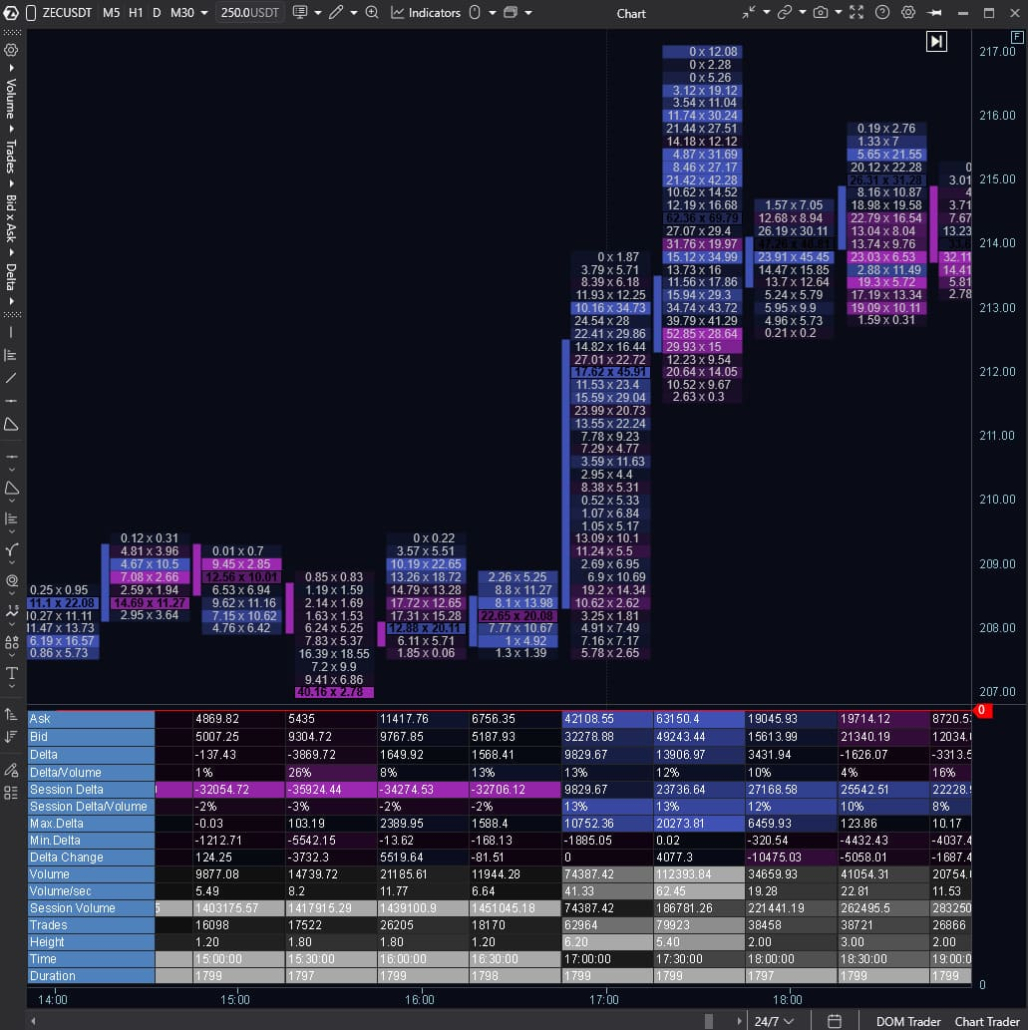
Cluster Statistics is an indicator that complements footprint analysis

Footprint Inside Smart DOM

Unlike most analytical tools, ATAS allows you to analyze footprint data directly inside Smart DOM. This is especially useful when you need to monitor activity at specific price levels and within short time intervals without switching to a chart.

The feature is implemented as dedicated columns in the DOM:

Footprint — displays time-based clusters with buy and sell data at each price level. Flexible timeframes, visualization modes, and color settings allow for detailed analysis.

Rolling Footprint — a live footprint that continuously updates and shows activity over the last N seconds. It lets you observe changes in volume and initiative in real time. Tools like this are rarely available in other market analysis software.
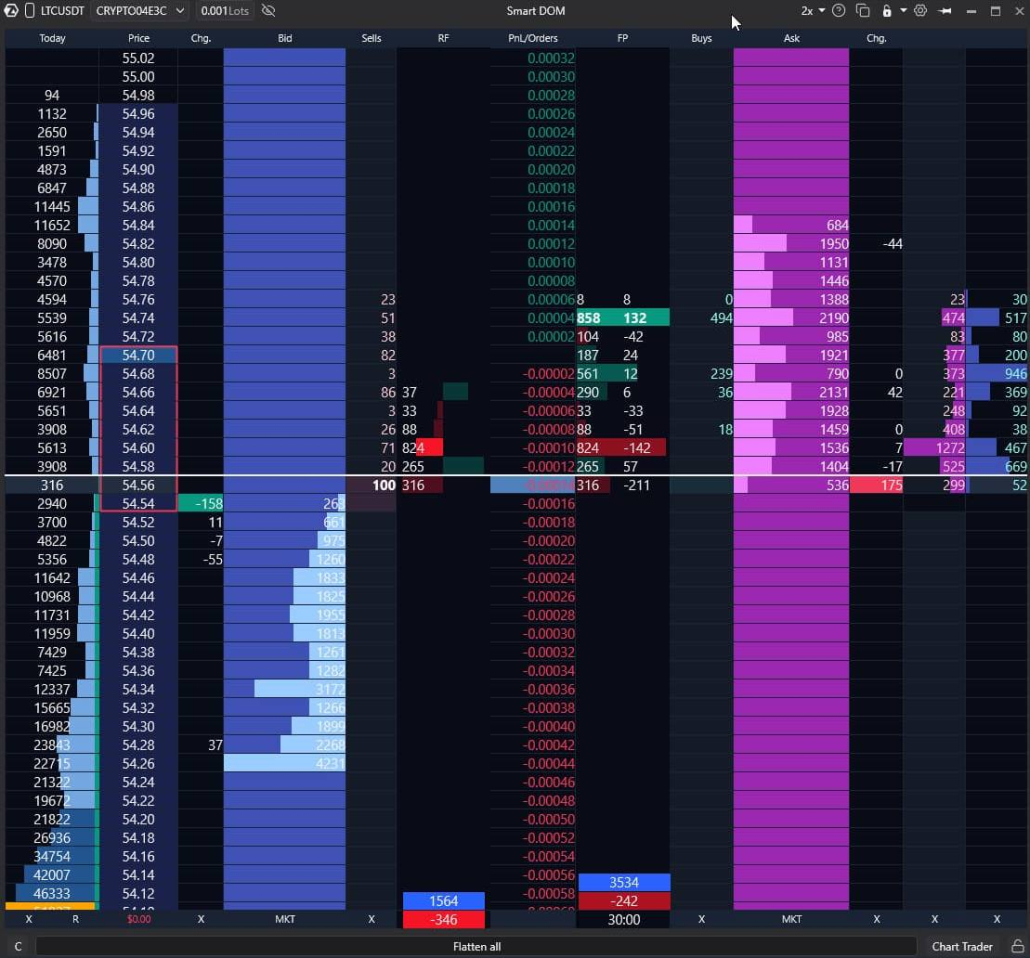
Footprint Inside Smart DOM in ATAS

Analyze Individual Candles Under a “Microscope”

Sometimes you need to quickly understand what happened inside a specific candle, but switching the chart to footprint mode isn’t convenient. For such cases, ATAS includes Magnifier — a tool that displays footprint data for a selected area directly on a standard candlestick chart.

With Magnifier, you can:
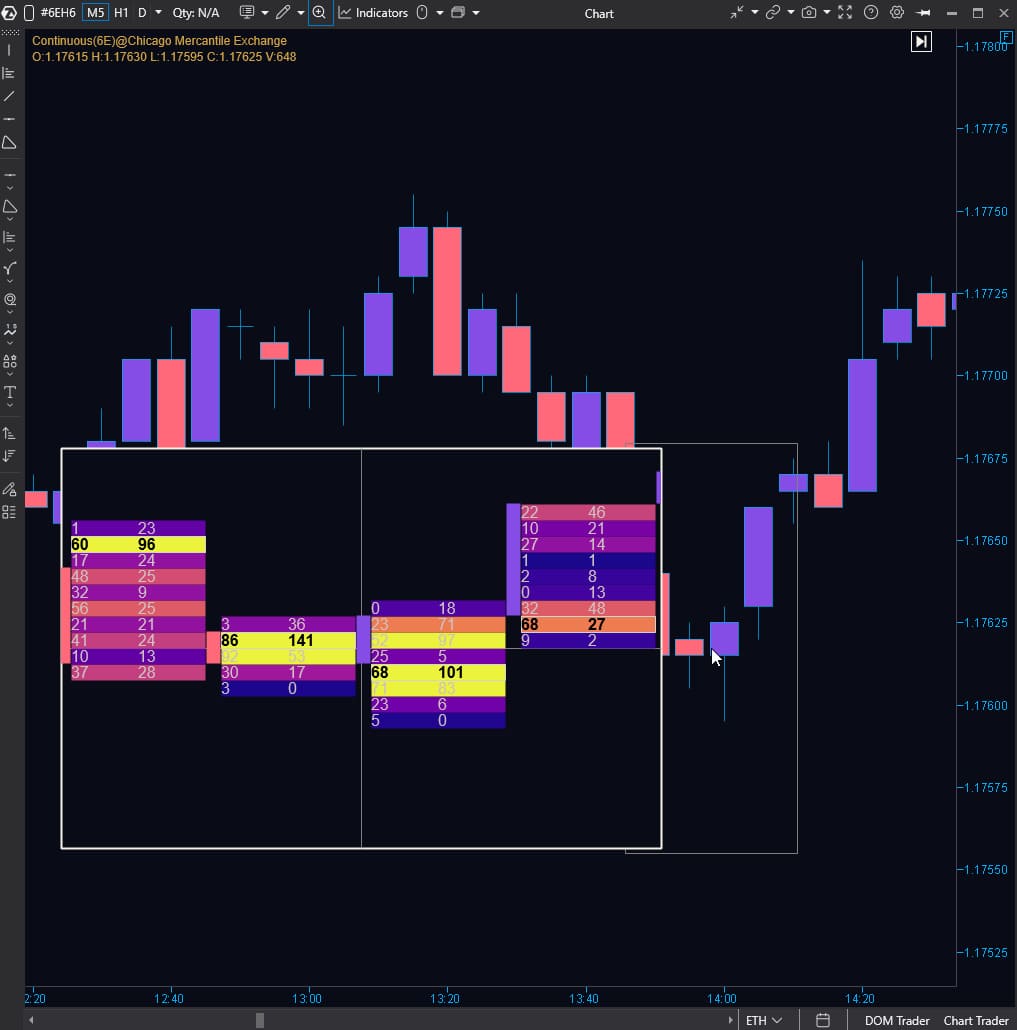
  • view the distribution of volume and activity inside a selected candle without changing the chart type;
  • better interpret spikes in activity and price reactions to volume at specific moments;
  • quickly inspect areas where “something is happening” visually and confirm it with cluster data.
ATAS Magnifier — a tool that displays footprint data for a selected area directly on a candlestick chart

API for Customizing Footprint Analysis

If standard tools aren’t enough, build custom solutions in C# using the ATAS API.

All footprint data is available out of the box. You don’t need to manually collect clusters from ticks, hunt for data sources, or set up storage like on other platforms.

Focus on ideas, not infrastructure:

  • Ultra-precise data: Access the same Raw Tick Data (price, volume, time, Bid/Ask) that powers ATAS — no losses or aggregation.
  • Ready-made infrastructure: We handle receiving, storing, and processing the tick stream. You access footprint data directly through convenient API tools.
  • Full customization: Define your own calculation logic, set criteria for zones and patterns, customize display styles, and more.

Don’t have time to code? Order custom development of any complexity on our marketplace.

Indicators for Finding Footprint Patterns

Footprint patterns are regularities in the structure of footprint data that recur across markets and provide additional context.

By observing patterns, you can:

  • identify supply and demand imbalances that may indicate trend continuation, consolidation, or reversal;
  • find zones with atypical volume distribution that require careful analysis;
  • get additional hypotheses confirmation for making decisions.

Manual pattern search requires expertise and focus.

In addition to advanced footprint chart software, ATAS offers a comprehensive set of tools to simplify this process.
Cluster Search
Cluster Search for Finding Footprint Patterns

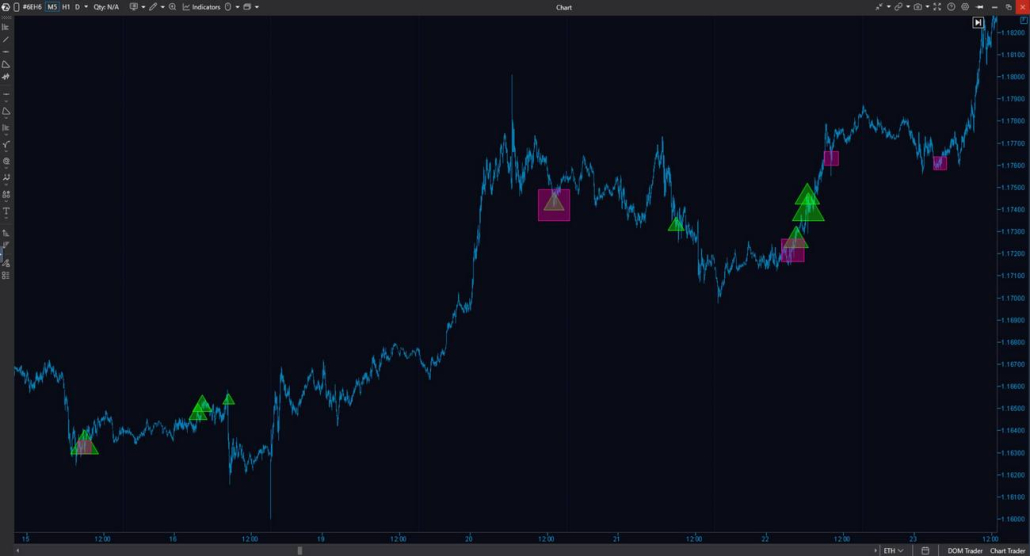
A footprint indicator with extensive customization capabilities. Configure search algorithms and filters within the footprint — including volume, delta, imbalances, cluster positions and extremes, level and bar consolidation.

Cluster Search highlights chart zones that match your selected scenario, from absorption to complex custom Order Flow patterns:

  • excludes irrelevant data, leaving only significant activity spikes;
  • creates custom search conditions based on multiple parameters;
  • visualizes accumulation and distribution zones around anomalous clusters.

Initial Balance
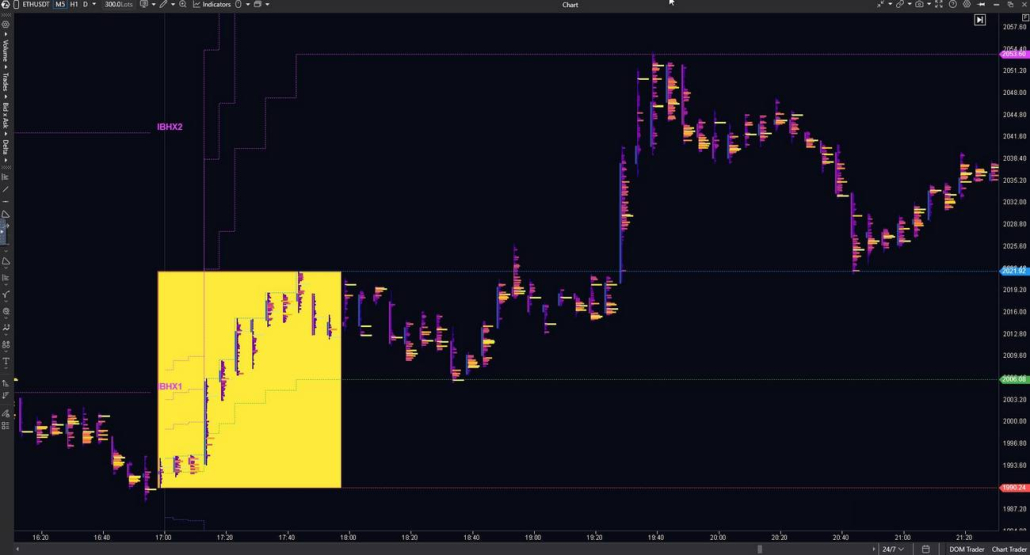
Initial Balance for Finding Footprint Patterns

The indicator captures the High/Low range for a selected period at the start of the trading session and marks key levels with lines on the chart.

This keeps the starting activity zone in focus, allowing you to compare how price interacts with its boundaries — including footprint data that show where volume is concentrated at each level and how buyer/seller activity is distributed.

The indicator helps:

  • identify potentially significant levels and reaction zones;
  • assess market character by the opening range (narrow/wide) and use this as context for further footprint analysis.

Stacked Imbalance
Stacked Imbalance for Finding Footprint Patterns

Highlights adjacent levels with a pronounced imbalance between buyers and sellers. Use when you need to:

  • identify a consistent imbalance structure within the candle, not just isolated imbalances;
  • analyze zones where initiative appears across multiple consecutive levels;
  • add volume distribution context to Bid × Ask and Delta footprints.

Absorption
Absorption for Finding Footprint Patterns

The indicator analyzes the distribution of Bid/Ask volumes across price levels and displays absorption levels on the chart. These levels highlight situations where active trades enter the market, but the price barely moves—held back by opposing limit liquidity.

The indicator helps:

  • identify levels where activity meets liquidity and triggers a price reaction;
  • complement Order Flow and footprint analysis by showing where volume concentrates in clusters while price changes remain minimal.

Exhaustion
Exhaustion for Finding Footprint Patterns

The indicator identifies moments when activity fades—price continues moving, but trading volume gradually decreases.

When combined with the footprint, this helps you quickly verify the movement: whether clusters show volume support or momentum is weakening.

The indicator helps you:

  • find areas where activity decreases while price direction remains consistent;
  • quickly identify zones worth analyzing through footprint structure: volume, delta, and price reaction.

Frequently Asked
Questions

Find answers to common questions about footprint charts
  • ATAS is designed as professional order flow footprint software, allowing you to use footprint charts for free — with no time limits — on the Start plan. This lets you explore footprint charts at your own pace and expand your toolkit as your needs grow.

    When you’re ready to enhance your analysis with unique timeframes that filter market noise (Renko, Reversal, Range X, XV, Z, US) and advanced indicators (Big Trades, Adaptive Big Trades, CVD Pro, CVD Pro Multi, Tape Patterns, OI Analyzer), simply activate a paid plan.

  • ATAS builds charts using exchange data — information about trades, volumes, and execution direction.

    For footprint crypto analysis, simply connect your Binance, Bybit, Kraken, or other exchange account via API.

    For futures and stocks analysis, connect a broker (NinjaTrader, Interactive Brokers, Exante, CapTrader, etc.) or market data provider (Rithmic, CQG, dxFeed, etc.). To work with futures and stocks, you’ll also need to activate a paid subscription plan.

  • Yes! ATAS offers several ways to work with charts without executing trades on a live account:

    • Replay — a simulator that recreates market activity based on tick-by-tick order book data;
    • ATAS Sim — a built-in demo account for practicing futures trading mechanics;
    • Crypto Sim — a built-in demo account for practicing Binance Futures trading mechanics.
  • Footprint analysis takes time and practice. ATAS provides a complete educational ecosystem to help you master it:

    • Courses, master classes, videos, and books from our partners on the Marketplace;
    • Regular marathons and live streams with professional traders;
    • Real market situation breakdowns in the blog;
    • Educational videos on the YouTube channel;
    • Community on Telegram and Discord, where you can discuss charts, share observations, and ask questions.
Try Footprint Analysis
in ATAS

Experience the advantages firsthand. Analyze volume, delta, and market structure with professional tools in a single professional environment

Try for free