There is no universal software that is equally effective for everyone. Your requirements depend on your specific tasks: some users prioritize execution speed and detailed market microstructure analysis, while others need only a standard chart on a higher timeframe.
In this overview, we analyze 10 popular solutions available in 2026 — from brokerage services to specialized analytical terminals. We evaluate their capabilities so you can choose a tool that suits your market analysis style without wasting time on endless testing.
Evaluation Criteria
Markets: Access to crypto, futures, stocks, or forex.
Toolkit: Availability of tools for working with volume, cluster charts (footprint), and liquidity.
Pricing: Transparency of fees, availability of demo access, and potential additional costs.
Technical Performance: Stability during high volatility and data rendering speed.
Security: Reputation, API transparency, and brokerage licensing.
Start now!
Try ATAS free with no time limit
Disclaimer: This overview is for informational purposes only and does not constitute financial advice. The order of platforms in the list is random. Before registering, always check the current terms and conditions on the companies’ official websites.
Quick Comparison: All Platforms at a Glance
| Platform | Best for | Markets | Order Flow | Free tier | Starting price | OS |
|---|---|---|---|---|---|---|
| ATAS | Volume and order flow analysis | Crypto, futures, stocks | ✓ Yes | ✓ Yes | €24.95/mo | Win / macOS* |
| TradingView | Technical analysis | All markets | ✗ No | ✓ Yes | $14.95/mo | Web |
| NinjaTrader | Customization with add-ons | Futures, options | ✓ Yes | ✓ Yes | $59.00/mo | Win |
| thinkorswim | US options | Stocks, futures, options | ✗ No | ✗ No | Commission | Win / macOS |
| Exante | Global brokerage access | All markets | ✗ No | ✗ No | Commission | Win / macOS / Web |
| Interactive Brokers | Execution and reliability | All markets | ✗ No | ✗ No | Commission | Win / macOS / Web |
| Webull | Beginners (stocks / ETFs) | Stocks, crypto | ✗ No | ✓ Yes | $0 | Win / macOS / Web |
| eToro | Social copy-investing | All markets | ✗ No | ✓ Yes | Commission | Web / Mobile |
| MetaTrader 5 | Forex and CFDs | Forex, futures | ✗ No | ✓ Yes | — | All |
| Binance / Bybit | Crypto | Crypto, futures, options | ✗ No | ✓ Yes | Commission | Web / Mobile |
What Are Trading Platforms?
The term “trading platform” often refers to completely different tools: from basic mobile apps to complex terminals that can take weeks to configure. To avoid confusion, let’s divide the existing solutions into three groups. This will help you immediately understand what you are dealing with: a tool for in-depth analysis or a venue for order execution.
Crypto Exchanges
An all-in-one format: a wallet, an exchange, and a trading interface. They operate autonomously, so they do not require additional connections to perform operations with digital assets.
Examples: Binance, Bybit
Brokerage Terminals
Your bridge to traditional markets — stocks, futures, or bonds. Here you handle organizational matters: opening accounts, managing margin, and working with reports. In these programs, charts are a supplement to the ability to securely execute orders through a licensed intermediary.
Examples: Interactive Brokers, Webull, thinkorswim
Analytical Terminals
The foundation for those who want to see through the market. Everything here is tailored for in-depth analysis: volumes, clusters, liquidity maps, and the activity of large players. The purpose of these programs is to show what is happening inside the price. Trading is secondary here: orders are placed through a connection to your broker or exchange.
Examples: ATAS, TradingView, NinjaTrader
1. ATAS. Professional Platform for Order Flow and Volume Analysis
Standard candlestick charts show only the result: where the price moved. ATAS looks inside each candle, revealing the actual mechanics of the market: where large volumes are concentrated, who dominates — buyers or sellers — and how liquidity is distributed in the order book.
- Year founded: 2011
- Audience: 360K+ users from 159 countries
- Supported markets: futures, stocks, and cryptocurrencies (direct connections to CME, NYSE, NASDAQ, Binance, Bybit, and others)
- Pricing: the START tier for the crypto market is completely free; paid subscriptions start at €24.95 per month.
Advantages of ATAS
Cross-platform Compatibility
The classic version runs on Windows (+ macOS via Parallels). Users also have access to ATAS X (Beta), a new version for Windows and macOS with a redesigned architecture and impressive speed for a new market interaction experience.
Exchanges and Other Connectors
Over 25 connections to key global exchanges (CME, NYSE, NASDAQ, Binance, Bybit), as well as popular brokers and prop firms via stable CQG, Rithmic, and dxFeed gateways.
Deep Volume Analysis
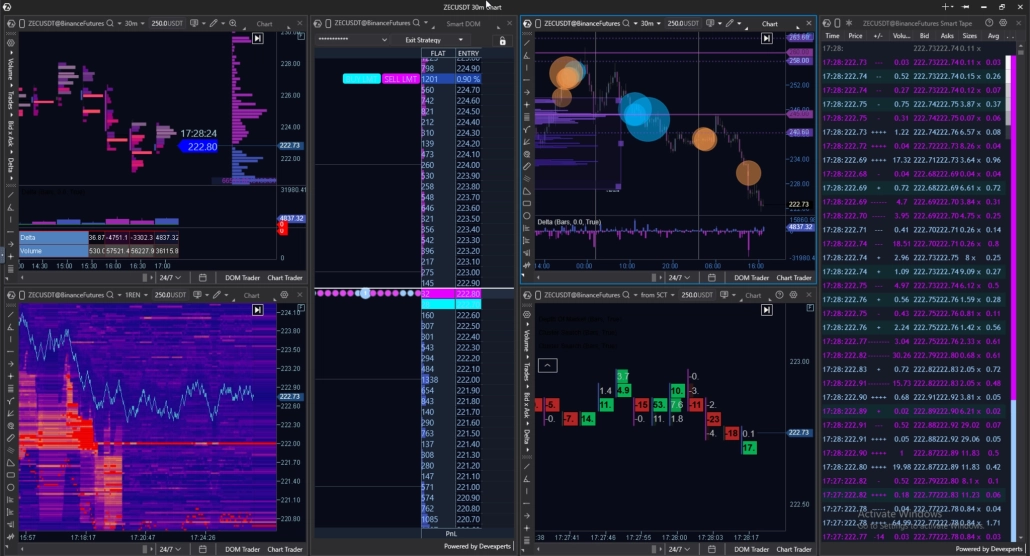
Over 400 footprint chart options for different tasks (Volume, Trades, Delta, Bid/Ask). The platform includes Market Profile & TPO, automated large trade detection (Big Trades, Cluster Search), and many other useful features.
Order Flow Analysis
A comprehensive suite of real-time tools for evaluating market aggression, speed, and the balance of power. It includes the multi-functional Smart DOM and Smart Tape with an order aggregation algorithm for assessing the real market picture. Traders also have access to the CVD indicator (with Pro and Multi versions for filtering large capital), an Order Flow chart based on Best Bid/Ask, Speed of Tape and Price Change indicators for assessing market pace, the Market Pressure widget, and more.
MBO (Market by Order)
An order book display mode based on the extended CME data feed (available via Rithmic). The indicator breaks down the aggregate volume at each level into individual orders, revealing their exact size, ID, and priority in the execution queue. It helps determine level structure and identify large limit order spoofing.
Independent Order Management
All operations are carried out via the exchange or broker API, while keys are encrypted locally on the computer. You can manage orders independently in one click from Chart Trader, Smart DOM, or DOM Trader, configure hotkeys, and set your own parameters for automating protective strategies.
Trading Journal
This is an automatic journal that aggregates statistics from demo accounts (ATAS Sim, Crypto Sim) and live accounts for risk and discipline control. In the module interface, users can independently analyze Net PnL, win rate, and drawdowns including commissions, as well as group their operations by personal playbooks. This makes it possible to analyze performance charts accurately and systematically test trading patterns on charts.
Heatmap (Beta)
A flagship liquidity heatmap that displays the history of limit order behavior over time. The graphics engine supports GPU rendering with performance of 600 FPS and higher for maximum smoothness even in volatile markets. It includes 3D mode, market trade Bubbles, and full synchronization with the footprint and order book when scrolling along the price axis.
API for Custom Indicators
An advanced C# API for developing custom indicators, custom modules, and automated analytical algorithms of any complexity. Flexible access management and the ability to monetize your developments on the marketplace.
Developed Ecosystem
A comprehensive support infrastructure that includes a marketplace with indicators, courses, templates, and other offers from ATAS partners, an up-to-date knowledge base, the educational Learning Center, and the Feature Request service for submitting software update requests directly. Official Telegram and Discord communities are available for sharing experience and discussing market situations.
Limitations
Steep Learning Curve
The analytical platform is designed for complex market microstructure analysis. Beginners need time to understand footprint modes, delta, and order book settings.
Desktop-only
There is no mobile app for smartphones or tablets, so monitoring the market on the go is not available.
Hardware Demands
Processing high-frequency tick data, rendering heavy heatmaps, and working with dozens of footprint charts simultaneously require a powerful PC with a dedicated graphics card. On weak or outdated hardware, FPS may drop during periods of high volatility.
Data Costs for Regulated Markets
While all crypto connections are direct and free, real-time data for futures (CME) or stocks requires separate paid subscriptions via connectors (Rithmic, CQG, dxFeed).
No Options Analysis
The software is focused specifically on spot and futures order flow. Tools for options are in development.
2. TradingView: A Universal Web-Based Platform for Beginners and Technical Analysis
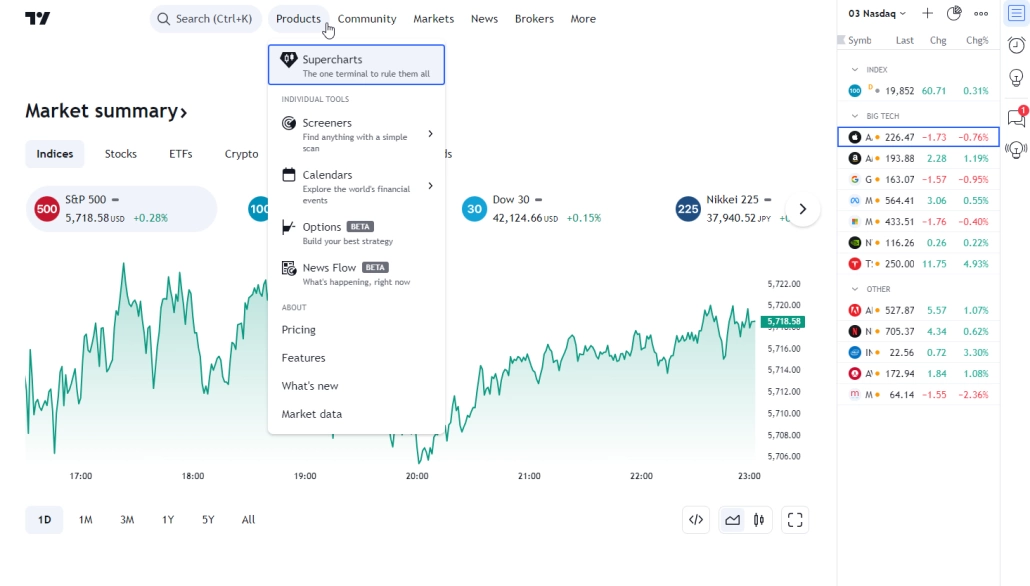
TradingView is a cloud-based ecosystem widely recognized as one of the best online platforms for traders thanks to its accessibility and visualization tools. It works directly in the browser, making the terminal a convenient entry point for beginners, while the Pine Script™ language provides enough functionality for advanced analysis.
- Year founded: 2011
- Audience: 50+ million monthly visits
- Supported markets: Stocks, futures, forex, cryptocurrencies, indices, bonds
- Pricing: A free version is available; paid plans range from $14.95 to $59.95 per month (billed annually)
Key Advantages
Versatility
As a browser-based application, it requires no installation and works on any operating system: Windows, macOS, and Linux. Mobile and tablet versions are fully synchronized with the web version.
Intuitive Interface
The simple design allows even beginners to start working with charts in just a few minutes.
Extensive Toolkit
The library of indicators and drawing tools is among the largest in the industry. Pine Script™ allows users to create, test, and publish their own trading strategies.
Social Ecosystem
Users publish trading ideas, follow analysts, and exchange thousands of scripts, making TradingView a unique social hub.
Broker Integration
TradingView is built around a broker ecosystem and receives ready-made data feeds from partner brokers. This is convenient for mainstream trading and visual analysis, but it is not always suitable for deep Order Flow research because data may be aggregated or smoothed on the broker side.
Important: ATAS, in turn, is designed for direct connection to exchange gateways (CQG, Rithmic, dxFeed), providing the raw tick data needed for market microstructure analysis and footprint charting.
Limitations
Focus on Graphical Analysis
TradingView is primarily designed for technical analysis. It does not include tools for deep quantitative research or a built-in trading journal that automatically aggregates statistics across all your accounts. If you need full performance analytics, you will need to implement it through third-party services.
No Professional Order Flow
Although TradingView has basic footprint and DOM tools, they are more like auxiliary features. They are significantly behind professional solutions in terms of depth and data detail. If you need to understand the logic of large participants more deeply or work with professional heatmaps, specialized analytical platforms like ATAS are a better fit, as they offer far more capabilities for this level of work.
Web Infrastructure Dependency
As a cloud-based solution, TradingView fully depends on internet connection stability and browser performance. It is not intended for high-frequency tick data processing or order execution speed expected from professional analytical platforms.
Community Content Risks
Although the TradingView community is a huge knowledge base, many ideas there are presented too superficially. They often ignore basic risk management rules, which can confuse beginners and push them toward hasty decisions.
3. NinjaTrader — A Powerful Choice for Futures Trading
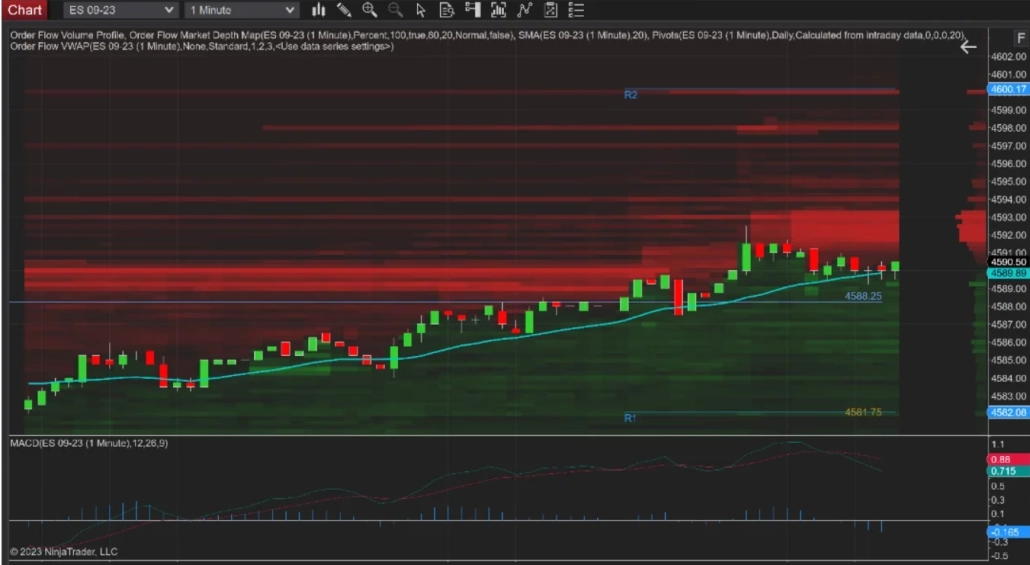
NinjaTrader began its journey in 2003 as specialized software for futures analysis, filling the niche between expensive terminals and beginner tools. Later, the company expanded its services, combining analytical platform and brokerage features into a comprehensive 2-in-1 solution.
Today, it is a choice for those who specialize in futures and need low commissions. The use of C# (NinjaScript) as its engine has created a huge ecosystem: a developer community has grown around NinjaTrader, creating thousands of third-party indicators and strategies.
- Year founded: 2003
- Specialization: Futures and options
- Pricing: Basic plan is free. Order Flow+ tools are $59/month or $1,499 (Lifetime).
- Compatibility: Windows (native)
Key Advantages
Futures Focus
Well suited for futures trading, offering some of the lowest margin requirements on the market.
Development Flexibility
The use of C# makes it possible to create complex automated strategies and indicators of any complexity.
Direct Execution
High-speed access to exchange gateways, which is critical for active trading.
Limitations and Pitfalls
The Add-On Trap
Despite its free basic version, NinjaTrader is a huge marketplace for third-party software. Out-of-the-box functionality is quite limited, so traders often have to buy dozens of third-party indicators, control panels, and trade copying tools. As a result, a “free” terminal can quickly turn into an expensive construction kit.
Complex Cost Structure
Total cost depends heavily on the selected plan. If you choose Ninja as a broker and do not trade often, the potential benefit can be offset by inactivity charges and multiple fees.
Limited Markets
NinjaTrader works only with futures; there is no access to equities or spot cryptocurrencies.
Important Nuance: NinjaTrader is a solid foundation for execution, but if you need deep visual analysis of market microstructure out of the box without building a setup from paid third-party extensions, you can connect NinjaTrader to ATAS. This allows you to analyze exchange quotes from NinjaTrader using advanced volume and order flow tools.
4. thinkorswim (by Charles Schwab) — The Choice for Professionals in the U.S.
The “gold standard” among active traders in the U.S. After moving under Charles Schwab, the platform retained powerful functionality for working with options, futures, and complex strategies.
- Year founded: 1999 (originally part of TD Ameritrade)
- Clients: Primarily U.S. residents
- Markets: Stocks, options, futures, Forex
- Pricing: Commission-based model ($0 for stocks and ETFs)
Key Advantages
Options Tools
thinkorswim offers some of the best market capabilities for analyzing options strategies, including Risk Profile and probability visualization.
Ecosystem
A unified environment across desktop, web, and mobile. The built-in paperMoney mode is one of the highest-quality simulators for testing strategies on historical and real-time data.
Screeners
Powerful Stock Hacker and Option Hacker tools allow users to filter thousands of instruments by complex technical and fundamental criteria.
ThinkScript
A proprietary programming language that allows users to create unique custom indicators and automated algorithms.
Limitations and Pitfalls
Geography
thinkorswim is primarily focused on the U.S. market, which creates barriers for users in other regions.
Complexity
The huge set of settings and tools creates a steep learning curve, which can be excessive for beginners.
Professional Niche
The functionality is focused on classical trading and price analysis, but it does not specialize in market microstructure the way niche professional solutions do.
Important Nuance: thinkorswim is a powerful command center for decision-making and execution, but it is not specialized in Order Flow analysis. If you use thinkorswim for trading but need deep footprint or liquidity analysis, the ATAS analytical platform is an ideal complement.
5. eToro: The Leader in Social Investing
eToro is a unique ecosystem that has made investing accessible to a wide audience by turning it into an interactive social process. It brings together millions of participants, offering tools for automated copy trading and portfolio management.
- Year founded: 2007
- Clients: Over 35 million registered users
- Supported markets: Stocks, ETFs, cryptocurrencies, indices, commodities, and currencies (over 5,000+ instruments)
- Pricing: Commission-based model (spreads, withdrawal fees, and inactivity fees).
Key Advantages
Social Features
The CopyTrader system allows users to automatically replicate trades of successful investors, while Smart Portfolios offer ready-made thematic investment strategies.
Beginner-Friendly
An intuitive interface and a full-featured demo account for risk-free practice.
Regulation
The company is overseen by top-tier regulators, including the FCA (UK), CySEC (Cyprus), and ASIC (Australia).
Additional Benefits
Opportunity to earn interest on uninvested cash balances.
Limitations and Pitfalls
Costs
Spreads can be higher than those of specialized exchange brokers, and withdrawal fees may also apply.
Lack of Professional Analytical Software
eToro does not support connections to external terminals such as ATAS, which limits options for deep market microstructure analysis.
Restrictions
Certain instruments are unavailable in specific jurisdictions, and customer support can be overloaded because of the large number of users.
Important Nuance: eToro is a social investment environment, not a tool for deep exchange analysis. If you want to combine the best of both worlds, use ATAS to identify entry points and analyze market logic (Order Flow), and eToro as a venue for order execution and building a public ranking to attract copy investors. This allows you to combine a professional analytical approach with the scalability of social investing capital.
6. Webull — A Popular Choice for Commission-Free Trading
Webull has built a strong reputation as one of the best platforms for beginners, offering an intuitive interface and a commission-free trading model. It is a modern solution for working with stocks, ETFs, and options.
- Year founded: 2017
- Clients: Millions of active traders
- Supported markets: Stocks, ETFs, options, crypto
- Pricing: $0 commission on standard U.S. stock and ETF trades.
Your Advantages
Accessibility
Thanks to no minimum deposit and zero-commission policy, it is well suited for getting started.
Tools for Learning
The paper trading feature allows you to practice strategies in real time without financial risk.
Functionality
You get access to extended trading hours and the Chart Trader feature for quick order placement.
Limitations and Pitfalls
Depth of Analysis
Despite having quality data, Webull does not offer the analytical power of professional terminals.
Analytical Constraints
It does not include tools for working with true Order Flow or footprint charts, which are necessary for understanding market microstructure.
Important Nuance: Webull is an excellent execution hub. However, if you aim for a professional result, combine Webull’s execution capabilities with the ATAS analytical platform. Use ATAS for deep volume and market logic analysis, then transfer your ideas to Webull for instant commission-free execution. This allows you to keep the simplicity of a retail app while using professional data for decision-making.
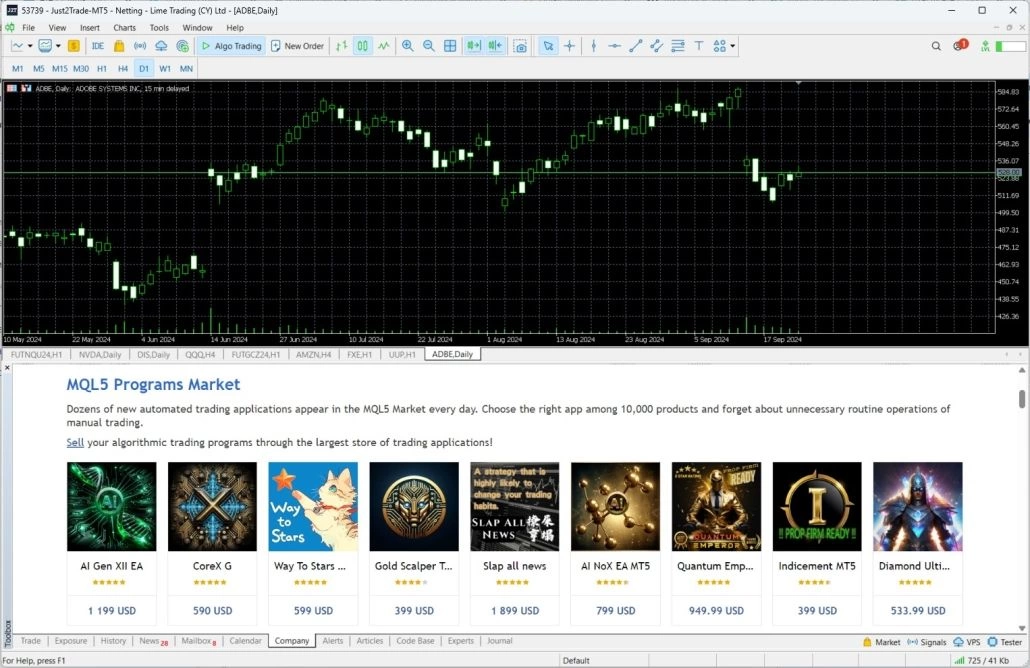
7. MetaTrader 5 — The Industry Standard for Forex and CFD
MetaTrader 5 (MT5) remains the undisputed industry standard, with more than 100 million downloads on Google Play alone and a multi-million user base across iOS and desktop. The platform, which has officially surpassed MT4 in trading volume (54.2%), now connects an ecosystem of more than 1,000 brokers and prop firms worldwide, continues to update regularly, and maintains its status as the #1 tool for millions of traders and analysts.
- Released: 2010
- Specialization: Forex, CFD, stocks, futures
- Pricing: Free for the user (the broker pays the license fee)
- Compatibility: Windows, macOS, Linux, Web, iOS, Android
Key Advantages
Scale and Accessibility
With support for more than 1,000 brokers, finding a suitable intermediary for working through MT5 is easy.
MQL5 Ecosystem
A huge marketplace of ready-made Expert Advisors (robots), indicators, and scripts makes it possible to automate trading even without programming skills.
Professional Features
Support for hedging, strategy testing on historical data, and a built-in economic calendar.
Stability
The functionality has been refined over many years, ensuring high reliability of order execution under a stable internet connection.
Limitations
Forex Risks
MT5 has become the main platform for Forex brokers with questionable reputations. Many companies offering this platform operate as dealing desks, where the broker profits from trader losses rather than commissions. Engaging with retail Forex dealing is often a path with a negative mathematical expectation.
Dated Interface
Visually, MT5 looks like software from the early 2010s, which may feel unusual for users accustomed to modern web interfaces.
Quality of Expert Advisors
The marketplace is filled with low-quality trading robots, and using them can quickly lead to capital loss.
Lack of Deep Analytics
MT5 lacks built-in tools for footprint charting or Order Flow visualization, which are necessary for professional market microstructure analysis.
Important Nuance: MT5 can be used as a connection channel to a broker for receiving quotes. You can link it with ATAS, where ATAS acts as a professional analytical core. MT5 transmits the data, while ATAS visualizes it through footprint charts, volume profiles, and other liquidity analysis tools that are not available in the standard MT5 interface. This allows you to make decisions based on real market logic.
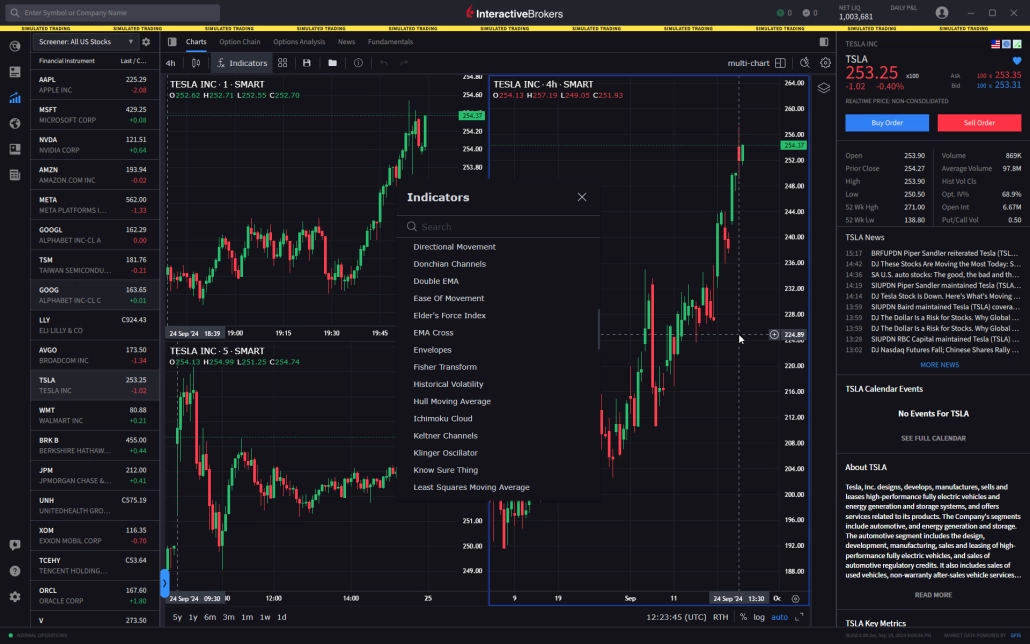
8. Interactive Brokers (IBKR) — The Benchmark for Reliability and Global Access
Interactive Brokers is one of the world’s largest brokerage firms, serving over 4.6 million client accounts. It is the choice for those who need maximum reliability and direct access to global exchanges. In 2026, the company once again confirmed its status, earning dozens of awards as Best Broker for Active Traders and Best Broker for Professionals according to StockBrokers.com and ForexBrokers.com.
Year founded: 1978
Clients: 4.6+ million active accounts
Supported markets: stocks, options, futures, currencies, bonds, crypto assets
Pricing: Commission-based model (Tiered or Fixed); no subscription fee for using the terminals.
Key Advantages
Uncompromising Reliability
The company is regulated by major global authorities, including the SEC, CFTC, FCA, and FINRA. Client assets are protected by SIPC coverage.
Global Reach
Access to more than 170 markets in 33 countries from a single account.
Professional Toolset
You can use the classic TWS terminal, the modern IBKR Desktop, or a convenient mobile app.
Advanced Capabilities
Industry-leading conditions for trading options and stocks, as well as access to complex market instruments.
Limitations
Steep Entry Barrier
The account opening and verification process may seem cumbersome for beginners.
Technical Focus
The native software is focused on execution rather than visual analysis. It does not include built-in tools for footprint charting or detailed Order Flow visualization.
Support
Due to the company’s scale, support responses may sometimes take longer than with local brokers.
Important Nuance: If you lack Order Flow tools in IBKR, you can connect your account to the ATAS analytical platform. This allows you to combine the execution reliability of Interactive Brokers with professional market microstructure analysis capabilities that are not available in the broker’s native terminal.
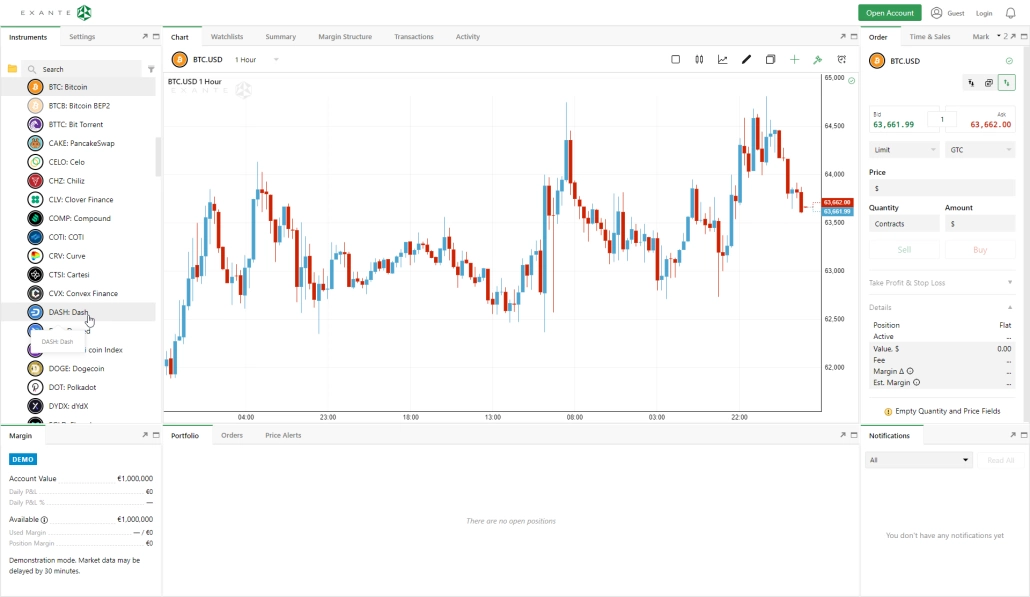
9. Exante — Universal Access to Global Markets
Exante stands out from competitors with its incredible breadth of coverage. It is a brokerage platform for those who need access to the widest possible range of assets from a single window. Exante’s infrastructure allows users to work with more than 1,000,000 instruments, including stocks, exchange-traded funds (ETFs), futures, options, and currency pairs.
Thanks to a developed ecosystem, users get seamless access to assets through a web interface, mobile app, or desktop versions for different operating systems.
- Year founded: 2011
- Regulation: CySEC (Cyprus)
- Supported markets: Stocks, ETFs, futures, options, currencies (Forex), bonds, funds
- Pricing: Minimum entry threshold is €10,000; commission-based model per order execution.
Key Advantages
Exceptional Coverage
Access to virtually any liquid instrument on global venues.
Versatility
A unified account for working with all asset classes without switching between terminals.
Infrastructure Reliability
Transparent regulation under the jurisdiction of Cyprus (CySEC) and the availability of a demo mode to evaluate the system’s capabilities.
Limitations and Pitfalls
Entry Barrier
The €10,000 minimum deposit requirement limits the broker’s accessibility for beginner users.
Analytical Base
Exante’s native terminal is primarily focused on execution and portfolio management rather than price movement analysis.
Lack of Specialized Tools
The standard interface lacks advanced visualization methods such as footprint charts or detailed microstructure analysis.
Important Nuance:Exante is a powerful gateway for working with a wide range of market data, but it is not a full analytical solution. For professional work, you can link Exante with ATAS. This turns Exante into a reliable data channel, while ATAS becomes the analytical core for working with footprint charts, volume profiles, and liquidity, which are not available in the native interface.
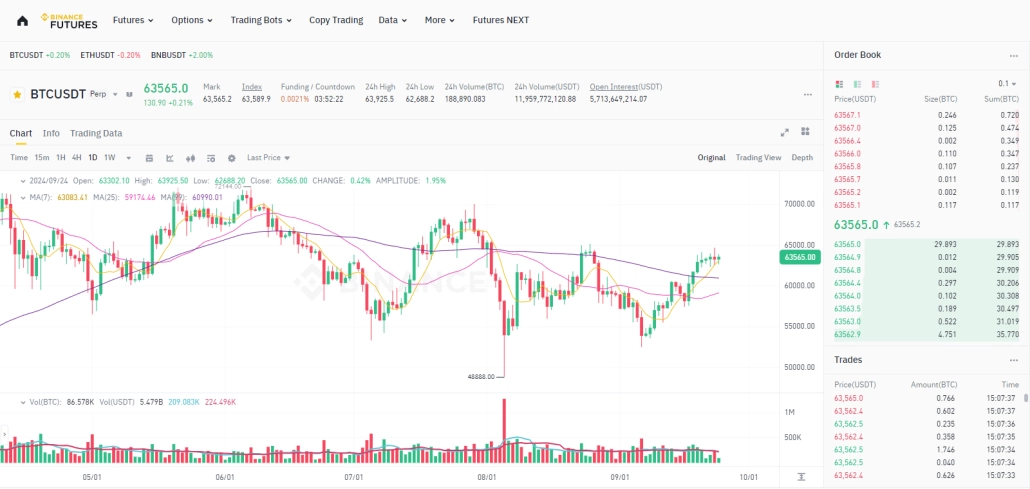
10. Binance and Bybit — Leading Venues for Crypto Assets
Check availability in your jurisdiction
U.S. clients can only access Binance.US — direct registration on Binance and Bybit is closed for this region. Before opening an account, check the current list of restrictions: geo-blocking rules change regularly.
Binance and Bybit are deservedly considered top-tier solutions for digital asset operations. Binance remains the world’s largest exchange by trading volume, processing tens of billions of dollars in operations daily. Bybit, in turn, is a dynamically evolving ecosystem that often provides early access to new projects. Both venues are widely considered among the most in-demand tools for active market participants.
- Year founded: Binance (2017), Bybit (2018)
- Clients: 200M+ (Binance), 50M+ (Bybit)
- Supported markets: Cryptocurrencies, futures, options
- Pricing: Commission-based model per order execution.
Key Advantages
Liquidity and Speed
Binance provides deep liquidity for large orders, while Bybit is known for high system throughput and fast listings of new assets.
Tooling
Both exchanges offer advanced capabilities for automation (API), yield management, and derivatives trading.
API Integration
Seamless connectivity to professional terminals such as ATAS for real-time market data analysis.
Limitations and Pitfalls
Geographic Restrictions
Access varies: for example, U.S. clients can use Binance.US, while direct access to Bybit is restricted for U.S. residents. Always check venue availability in your jurisdiction.
Interface and Analysis
Although standard web and mobile exchange interfaces are intuitive and well suited for beginners, they are not designed for deep professional analysis. They are built for convenient management, not for researching market microstructure.
Important Nuance: Standard exchange interfaces are convenient for monitoring an account or making quick moves on the go. However, professional work requires deep market microstructure analysis. When you need a profound understanding of market logic, ATAS is the clear choice. Through API integration, you can visualize data (footprint, volume profile, microstructure) in a professional terminal. This gives you the analytical foundation for decision-making that standard web interfaces cannot provide.
Also Worth Considering: Coinglass, Sierra Chart, and Jigsaw
Coinglass
is more of an analytical aggregator than a platform. Think of it as a radar that shows where significant leverage has accumulated, where mass stop-order position closures (liquidations) are happening, and what the total Open Interest looks like. You do not place trades there, but you use the data to assess market sentiment and search for imbalance zones.
Sierra Chart
A legend of professional trading. This is incredibly fast and flexible software with almost unlimited customization capabilities. It has an old-school interface, and its architecture requires deep immersion. You may need weeks to study the settings structure, configure charts, and master its internal programming language (ACSIL) to adapt the functionality fully to your requirements. This is not a quick-start tool, but one for traders building their workspace from scratch for the long term.
Jigsaw Trading
Another titan in the field of Order Flow. Jigsaw is known for its DOM (order book), a tool considered one of the best for reading the tape in real time. Like Sierra Chart, it is a solution for those ready to dive deeply into professional market mechanics, sacrificing modern design for functionality.
Important Nuance: These tools solve different tasks. Coinglass is your information shield for assessing sentiment and risk, while Sierra Chart and Jigsaw are professional working tools for those who build their workflow on deep exchange microstructure analysis and are ready to invest time in configuring complex software. But remember that you do not always need to switch between windows: ATAS already integrates tools that work on the same principle as Coinglass, such as Crypto Open Interest, Aggregated Liquidations, and Long/Short Ratio. This allows you to analyze market sentiment directly inside a single terminal without relying on third-party data aggregators.
How to Choose a Platform for Your Needs
Choosing a platform means finding a tool that becomes an extension of your strategy. Use these criteria:
Asset Classes and Markets
Make sure the venue gives access to the specific instruments you analyze. For futures and cryptocurrencies, the quality of the data feed is critical because delays directly affect the result.
Ergonomics and Speed
The functionality should not feel heavy to manage. If configuring a chart or finding a feature takes extra time, you lose focus. The ideal interface adapts to your workflow patterns.
Cost Structure
Study not only trading commissions, but also hidden costs: market data fees, swaps, margin requirements, and withdrawal fees. They should be transparent and predictable.
Analysis Functionality
For working with market logic (Order Flow, volume, microstructure), standard out-of-the-box charts are not enough. Look for software with deep data visualization, heatmaps, and a full-featured order book.
Security and Regulation
- If you choose a broker or exchange, check for licenses from reputable regulators (FCA, CySEC, ASIC) and service availability in your region.
- If you choose analytical software, assess the developer’s history, update stability, and API connection security. An analytical terminal should not store your keys or passwords in plain text.
Key takeaway:
Separate the functions. Treat the broker as a reliable channel for order execution (a gateway to the market), and the professional terminal as the analytical core where you spend 90% of your time making data-based decisions.
FAQ
Your choice should be based on your personal objectives and work style, not brand popularity. First, determine your priority: quick execution on the go or deep analytical work that requires complex software. Focus on asset availability, fee structure, and the presence of professional data analysis tools that match your methodology.
For a trader, a platform is the main tool for working in the market. They can be divided into three functional groups:
- Crypto exchanges. Venues for direct access to assets and cryptocurrency exchange.
- Brokerage platforms. Tools that provide access to stock and commodity markets through an intermediary.
- Professional analytical platforms. This is the heavy artillery. They are not always needed for order execution itself, but they are where you conduct the main analysis of market logic that cannot be obtained in standard exchange or brokerage interfaces.
When starting out, do not look only for the most popular platform; focus on three criteria:
- an intuitive interface;
- a high-quality demo account for risk-free practice;
- access to basic educational materials.
For a beginner, it is important that the software allows a quick start without overloading the workspace with complex settings that can distract from learning the fundamentals of market logic. Choose a solution with a low barrier to entry where functionality can be expanded as your experience grows.
Popularity often reflects reliability and liquidity depth. In 2026, clear leaders have emerged:
- In the crypto market: Dominates Binance, holding about 35% of the global derivatives market. In the first quarter of 2026 alone, derivatives trading volume exceeded $4.9 trillion, several times higher than its closest competitors.
- In classical financial markets: The leader remains Interactive Brokers. This is confirmed by data from February 2026: the broker serves more than 4.6 million client accounts with combined capital of approximately $820 billion.
This concentration of users and capital shows that professionals choose venues with the deepest order books, where large positions are executed with minimal slippage.
The method depends on the type of platform you are using:
If it is a broker or exchange: The key indicator is the presence of licenses from reputable regulators (FCA, CySEC, ASIC, etc.). Before registering, always check the company’s status in the official regulator’s registry. This is your protection in case of disputes.
If it is an analytical terminal: Such programs are not financial intermediaries, so they do not have brokerage licenses. Reliability is determined differently:
- Reputation and history: How long the software has been on the market and how actively its tools are being developed.
- Technical quality: Stability, data update speed, and absence of freezes.
- Data transparency: How transparent the company is regarding updates, technical support, and communication with developers.
- Connection security: If the software supports trade execution, it must do so via official APIs of verified brokers without storing your passwords.
When choosing analytical software, look at how actively it is used by the professional community and major market data providers.
The one that can process raw tick data streams without delay and provide maximum flexibility in visualization. When choosing a tool for working with market logic, evaluate the presence and implementation of the following characteristics:
- Footprint depth settings. The platform should not just split a candle into Bid/Ask; it should allow flexible data filtering: configuring views by volume, delta, time, ticks, or range, as well as highlighting large individual spikes (imbalances).
- Dynamic Heatmap. A liquidity visualization tool must display the history of limit order changes in the DOM in real time. It is important that you can adjust contrast and filter noise, separating real large orders from spoofing.
- Module Linking. This is a critical software architecture requirement. All open windows — charts, DOMs, and Time & Sales — must synchronize instantly. Changing the analyzed instrument in one module should update data in all the others immediately.
- Modularity and Workspaces. Professional analysis requires working with multiple monitors and dozens of windows. You should be able to group modules, save custom templates and layers, and avoid overloading the processor.
- Deep Structural Analysis (Market Profile / TPO / MBO). A good terminal supports volume profile work across any time interval and provides access to MBO (Market By Order) data, so you can see not just the total mass of limit orders, but specific orders inside each price level.
Bottom line: The best platform is the one that lets you assemble these modules into a single, seamless analytical environment tailored to your specific strategy while ensuring native connectivity between all data streams.
This is a common misconception among beginners who are used to making things harder for themselves. In 2026, it makes no sense to use one terminal for analytics and an exchange just for “button-pushing.”
If you choose a professional solution like ATAS, the need for a zoo of different programs disappears. You get a complete workstation where analytical power (footprint, liquidity maps, profiles) and trading functionality (fast DOM, position management) are integrated into one circuit. This eliminates time spent synchronizing windows between different programs and avoids the latency effect, when you see a signal in one place but execute it in another.
Separating platforms is for those who have not yet moved to all-in-one professional software. In a quality environment, analysis and execution should be one unified whole so you do not lose precious seconds in the moment.
Conclusions
There is no perfect platform for everything — there is only a tool that perfectly meets your specific needs. If you are looking for versatility where analysis and execution are combined into a powerful professional framework, try ATAS.
We have created an environment where market logic, footprint, and liquidity heatmaps work for you, eliminating unnecessary delays and the zoo of multiple programs. Start for free on cryptocurrency markets or use the demo version and Replay mode to sharpen your skills without risking capital.
ATAS provides tools for market analysis and data visualization and performs exclusively technical functions: data processing, chart building, indicators, and other analytical tools. All decisions are made independently by the user based on their own analysis.
Subscribe
Get the latest ATAS news delivered conveniently