Perfect
Chart Organization
When trying to follow multiple assets at once, it is easy to get lost in a chaos of open windows. ATAS resolves this elegantly: charts and modules group neatly into independent workspaces, while independent layers maintain perfect order within them.
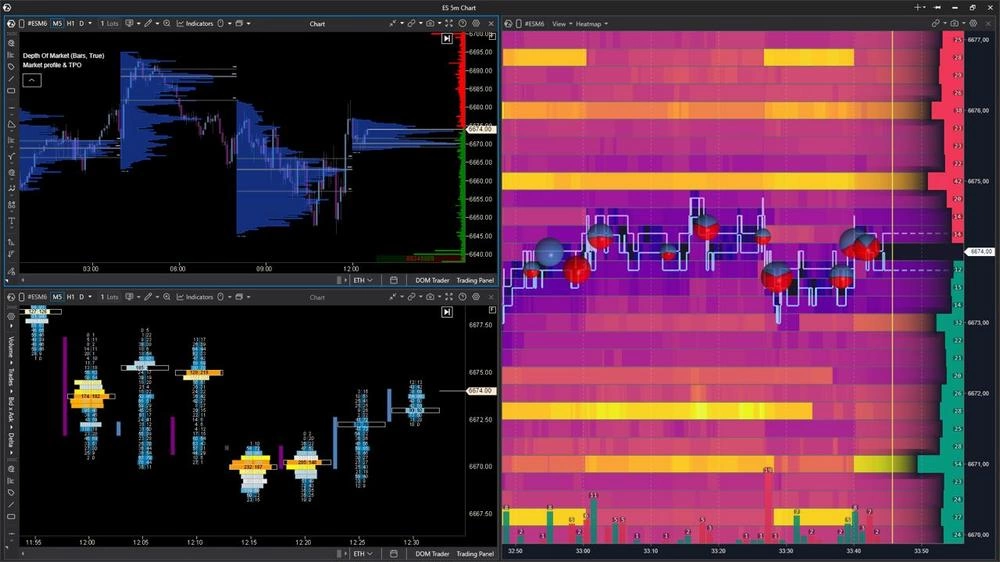
Group modules into independent workspaces and layers to clear your screen of extra windows. Switch between working zones in a single click or via hotkeys.
Independent Workspaces
You can assemble any set of modules for a specific asset into a single workspace. Personalize your workflow: easily complement your chart analysis with the Smart DOM and Heatmap modules—when you scroll or zoom, they move in unison thanks to price-axis synchronization. Or add the Smart Tape, Watchlist, and Market Pressure widget to your workspace. Window configuration is unique to each space.
Fast Layer Switching
Use layers to divide screens within a single workspace. For instance, you can switch between charts of different assets while preserving your custom layout configuration of windows and modules.
Flexible Module Layouts
Adjust the position and proportions of windows with your mouse to divide the screen into functional zones precisely suited to your style.