
Trading hours are more than just an exchange schedule. The time of day can affect liquidity, spreads, volatility, and order execution conditions. Some markets operate for only a few hours a day, others trade nearly around the clock, while cryptocurrencies are available 24/7. Ignoring these differences can lead to unexpected gaps, thinner liquidity, and higher trading costs.
This guide covers US stock market trading hours, futures, options, Forex, cryptocurrencies, and the trading schedules of major global exchanges. We’ll also explain the difference between regular and extended trading sessions and look at how trading hours affect volume, volatility, and trade execution.
Start now!
Try ATAS free with no time limit
US Stock Market Trading Hours (NYSE & Nasdaq)
The main US stock market session runs from 9:30 AM to 4:00 PM Eastern Time (ET). These are the regular trading hours for stocks listed on the NYSE and Nasdaq. US equities can also be traded during extended hours through pre-market and after-hours sessions, although the exact schedule depends on the exchange and trading venue.
Regular Trading Hours: 9:30 AM–4:00 PM ET
Regular trading hours for the US stock market are 9:30 AM to 4:00 PM ET. This is the primary trading window, when a large share of market activity and liquidity is concentrated.
If you trade from another time zone, keep US daylight saving time changes in mind. In 2026, US daylight saving time begins on March 8 and ends on November 1. As a result, the US session shifts by one hour relative to UTC during the year.
In ATAS, you can configure the platform to display market times in your preferred time zone. This is useful when analyzing markets across different regions and comparing trading sessions without manually converting the time.
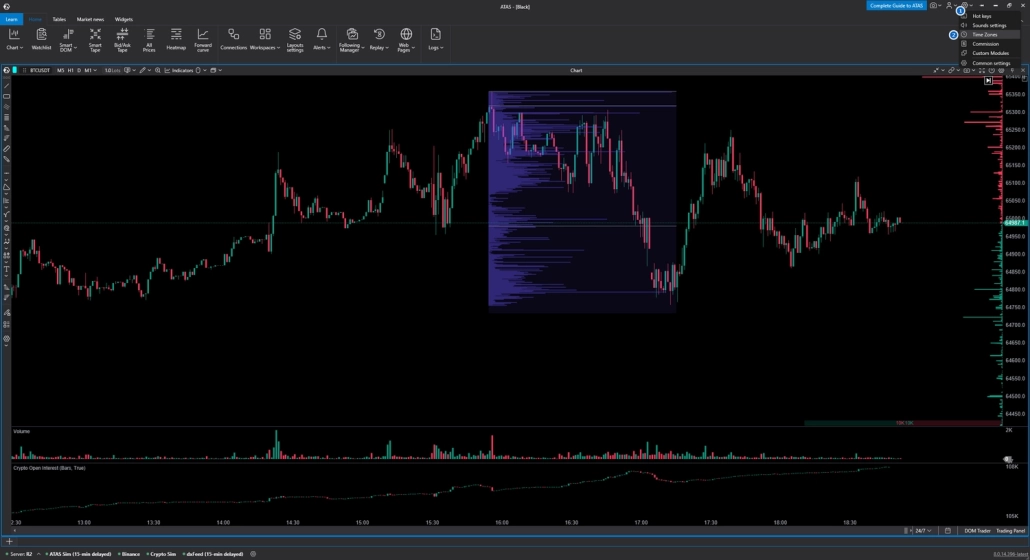
To configure the time zone:
- In the top-right corner of the platform window, open the Settings menu.
- Select Time Zones.
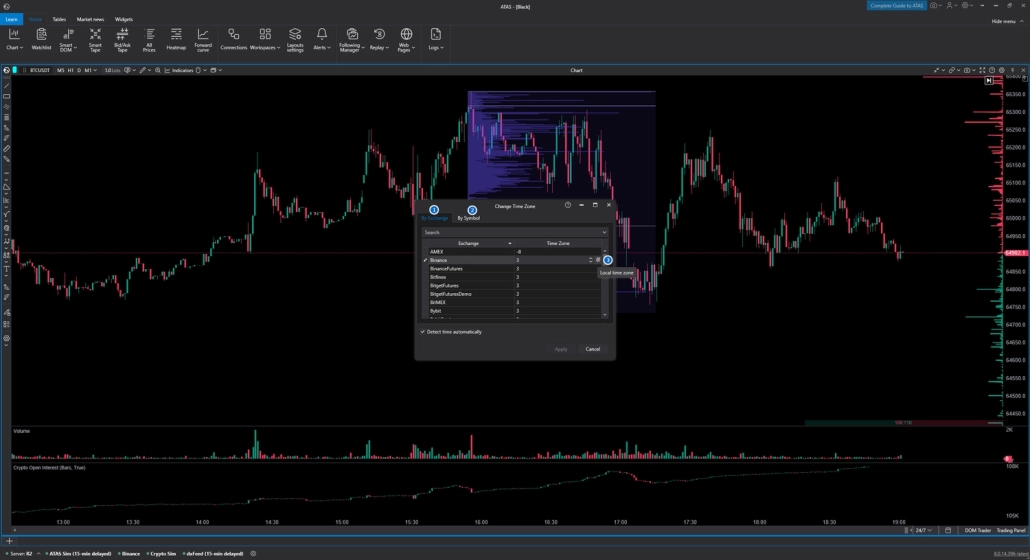
Choose the required setting:
1. By Exchange — when this setting is enabled, the time zone will be applied to all instruments of the selected exchange.
2. By Symbol — the time zone will be applied only to the selected instruments.
3. Set Local Time — sets the local time to the exchange / instrument that is selected.
After configuring the time zone, refresh the chart by right-clicking it and selecting Refresh from the context menu.
NYSE & Nasdaq Trading Hours
NYSE and Nasdaq have the same regular trading hours — from 9:30 AM to 4:00 PM ET. Both venues also support trading outside the regular session, although the exact extended-hours schedule depends on the venue.
The main difference between them is not the regular session schedule, but how trading is conducted. NYSE uses a hybrid model that combines electronic trading with an auction mechanism and the participation of Designated Market Makers (DMMs). Nasdaq operates as a fully electronic marketplace, where orders and quotes are processed through electronic infrastructure.
For traders, this difference is usually less important than the specific conditions for order execution: available liquidity, spreads, market depth, and the trading session in which the order is placed. When trading stocks, it is therefore important to consider not only the exchange name but also the specific trading venue and session type.
Pre-Market Trading Hours
Pre-market is the trading period before the regular session opens.
For Nasdaq, it runs from 4:00 AM to 9:30 AM ET. During this time, market participants react to news, earnings reports, and economic data, but liquidity is typically lower and spreads are wider than during the regular session. This increases the risk of slippage and sharp price reactions to individual orders.
For traders, it is important to consider not only the direction of a price move but also trading volume. A move in a low-liquidity environment does not always reflect sustained demand or supply.
For more information on pre-market hours, participants, trading restrictions, and other specifics, see our separate article on the ATAS blog.
After-Hours Trading Hours
After-hours trading
takes place after the regular market session has closed. For Nasdaq, it runs from 4:00 PM to 8:00 PM ET. Similar late trading windows are available on some NYSE venues, although the exact schedule depends on the venue.
After-hours trading is particularly important during earnings season, when many companies release financial results after the regular session ends. News and updated guidance can trigger significant price moves before the next trading day begins.
During extended hours, there are typically fewer market participants and less liquidity, so spreads can be wider and prices may react more sharply to individual orders. Nasdaq notes that participation by market makers and ECNs in pre-market and after-hours trading is voluntary, which can result in lower liquidity and less favorable prices.
For this reason, it is better to assess after-hours price moves together with volume and liquidity. A sharp move on low volume and a move supported by substantial trading activity represent two very different market conditions.
Extended Hours Trading Explained
Extended hours trading
is the general term for trading outside regular market hours. For US stocks, it includes pre-market trading before the market opens and after-hours trading after the regular session closes.
During these periods, liquidity is typically lower and spreads are wider, so execution conditions can differ from those during the regular session. The specific extended-hours schedule depends on the exchange and trading venue.
Market Holidays & Early Closing Days 2026
NYSE and Nasdaq are closed on major US market holidays. In 2026, the regular trading session will also close early at 1:00 PM ET on November 27 and December 24. July 3 is a full market holiday, observed for Independence Day, which falls on Saturday, July 4.
Important
1:00 PM ET is the regular market closing time for the early-close sessions. Certain individual markets and NYSE options products have different closing times, so this table should be used specifically for the main US stock market, rather than applied automatically to all exchange-traded instruments.
Futures Trading Hours (CME Globex & Other Exchanges)
Futures can be traded almost around the clock during the trading week. For example, popular CME Globex index contracts are available from Sunday evening through Friday evening in US time, with a daily technical maintenance break. Exact trading hours vary by futures contract. For traders who focus on these markets, futures trading software can help analyze volume, market depth, and trading activity across different sessions.
How Futures Trading Hours Differ From Stocks
The key difference is simple: stocks trade within fixed market hours, while futures continue trading after the stock market closes. As a result, futures prices can react to news in the evening, overnight, or early in the morning while the stock market is still closed.
For traders, this means futures provide an almost continuous view of changing market expectations. However, liquidity is not evenly distributed throughout the trading day: activity typically increases when the US session opens, while spreads and market depth can change during less active hours.
CME Group Trading Hours (Globex)
Most popular CME Group futures trade on Globex from 6:00 PM to 5:00 PM ET the following day, with a daily break from 5:00 PM to 6:00 PM ET. This schedule applies, among others, to the major E-mini and Micro E-mini contracts on the S&P 500 and Nasdaq-100.
Micro E-mini contracts have the same trading schedule as their corresponding standard E-mini contracts. The main differences are the contract size and the value of the minimum price fluctuation, not the trading hours.
In ATAS, you can configure the trading session by right-clicking anywhere on the chart and selecting Settings from the context menu (or using the Ctrl+S keyboard shortcut). Then open the Sessions tab, check Custom Session Type in the Session Type field, and specify the start and end times for the trading session.
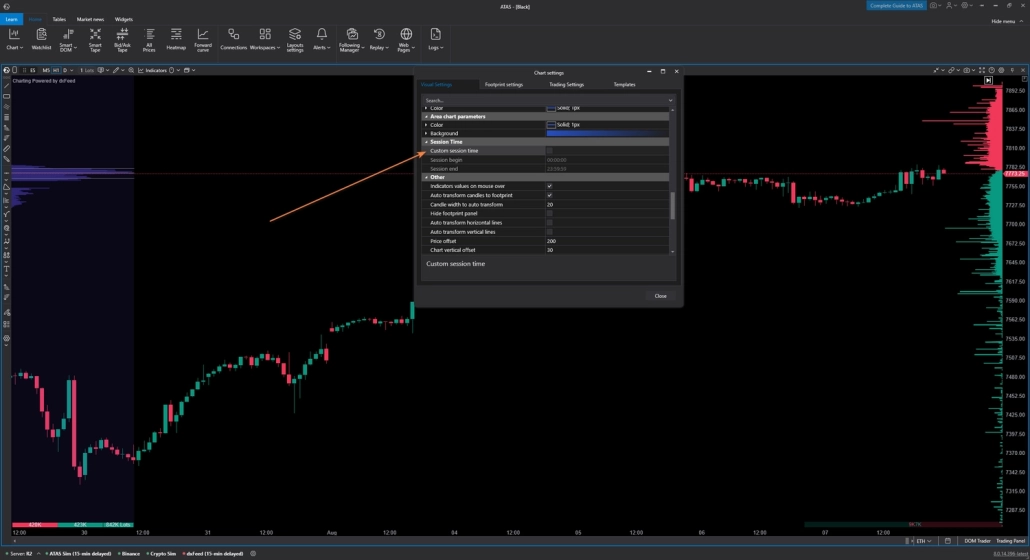
Daily CME Maintenance Break
The daily CME maintenance break typically runs from 5:00 PM to 6:00 PM New York time (ET). This is a technical window between trading sessions when major futures contracts are temporarily unavailable for trading.
The break allows the exchange to perform technical procedures and process market data. For traders, it is important to account for this window when managing positions, as trading may resume at a different price level.
Commodity Futures Trading Hours
WTI crude oil (CL) and gold (GC) futures on CME Globex trade from Sunday through Friday, from 6:00 PM to 5:00 PM ET the following day, with a daily break from 5:00 PM to 6:00 PM ET.
Liquidity and volatility vary throughout the session depending on the opening of major markets, the release of macroeconomic data, and industry-specific reports.
Futures Trading Hours by Product
Trading hours for popular CME futures vary by contract, although many products trade on Globex almost around the clock. The table below summarizes the main instruments covered above, including their regular trading session and daily maintenance break.
Important
The times shown are in Eastern Time (ET) and reflect the standard Globex schedule. Holidays and special sessions may have different trading hours, so check the calendar for the specific exchange before trading.
Trading Hours by Asset Class — Comparison Hub
Trading hours vary significantly across markets: US stocks have fixed regular session hours, futures trade almost around the clock, Forex operates five days a week, and cryptocurrencies trade 24/7. Options generally follow the schedule of their underlying market, although some index contracts have longer trading sessions.
Stocks vs Futures vs Options vs Forex vs Crypto
Exact trading hours depend on the specific instrument, exchange, and broker. This is particularly important for futures and options, as different contracts may have different trading sessions.
Options Trading Hours
Most US stock options trade during the same hours as the underlying stocks: from 9:30 AM to 4:00 PM ET on weekdays. However, some index options have longer trading sessions, so it is important to check the schedule for the specific contract before trading.
Trading hours for index options, such as options on the S&P 500, may differ from the standard schedule for stock options. Individual contracts may also have their own expiration rules and trading sessions. Therefore, relying only on NYSE or Nasdaq hours is not enough — always check the specifications for the specific option.
Forex Market Trading Hours & Session Overlaps
The Forex market operates nearly 24 hours a day from Sunday through Friday, with trading activity moving sequentially between the Asian, European, and US sessions. For traders, the London–New York session overlap is particularly important, as a significant share of market liquidity and trading volume is typically concentrated during this period.
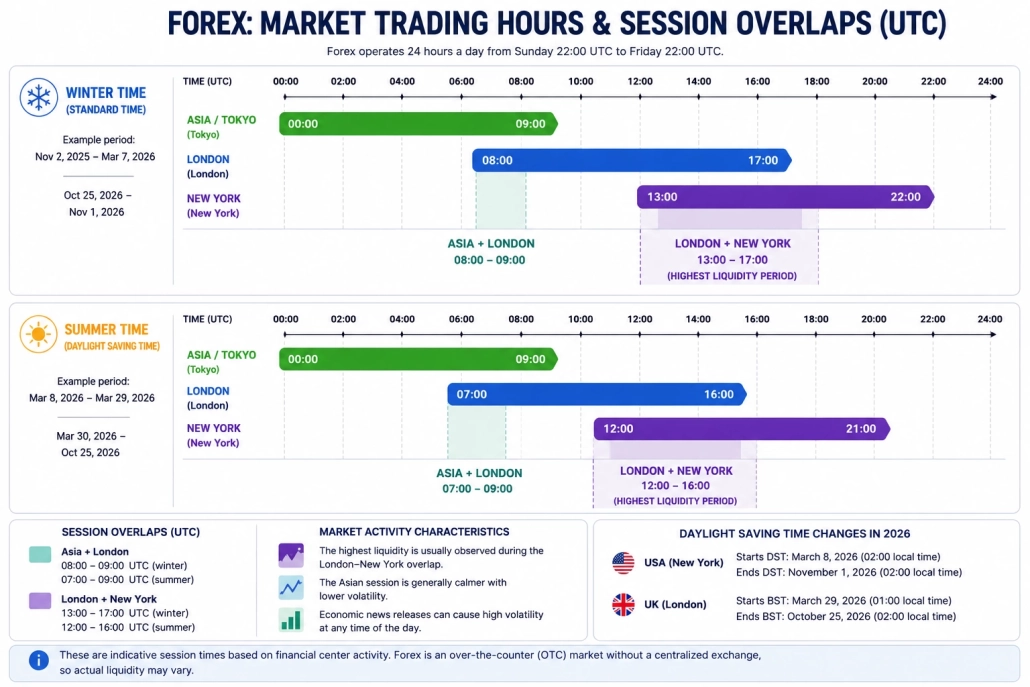
The diagram above shows the approximate active hours of major financial centers in UTC. Tokyo operates from 00:00–09:00 UTC, London from 08:00–17:00 in winter and 07:00–16:00 in summer, while New York operates from 13:00–22:00 in winter and 12:00–21:00 in summer.
In 2026, the US and UK switch to daylight saving time on different dates, so for several weeks in spring and autumn, the London–New York session overlap occurs at different times relative to UTC.
In ATAS, the Session Color indicator helps divide the chart into trading sessions and analyze how price and volume change during different periods of the day.
Cryptocurrency Trading Hours
The cryptocurrency market operates 24 hours a day, 7 days a week, including weekends and holidays. Bitcoin, Ethereum, and other crypto assets do not have a single daily opening or closing time like stock exchanges. This means price movements and changes in liquidity can occur at any time.
The absence of weekends does not mean that market activity remains constant around the clock. Trading volume and volatility vary depending on the time of day, the opening of traditional financial markets, and activity from participants in different regions. With ATAS for crypto trading, you can analyze volume and market activity across these continuous 24/7 sessions.
Risk management should also account for weekends: crypto market liquidity can change, and sharp price moves can occur without the pause associated with the traditional closing of major exchanges.
Gold & XAUUSD Trading Hours
Gold futures (GC) on COMEX trade on CME Globex from Sunday through Friday, from 6:00 PM to 5:00 PM ET, with a one-hour daily break. XAUUSD represents spot gold or a CFD, so its trading schedule depends on the specific broker and may differ from the GC futures schedule.
GC is a standardized exchange-traded contract, while XAUUSD does not trade on a single centralized exchange. When trading spot gold, always check your broker’s schedule, including any daily maintenance break and holiday restrictions.
This distinction also matters for market analysis: XAUUSD and GC are closely correlated, but their trading sessions and market data structure can differ.
Major International Exchanges — LSE, Tokyo & Others
Trading hours vary significantly across major stock exchanges. For example, the main session at the London Stock Exchange runs from 8:00 AM to 4:30 PM London time, while the Tokyo Stock Exchange divides its trading day into two sessions: 9:00–11:30 AM and 12:30–3:30 PM. The TSE has a one-hour lunch break between the two sessions.
For comparison, here are the regular sessions for several other major markets:
Global Market Hours Time Zone Converter
The table below provides a quick comparison of the trading hours of major international exchanges and can be used as a reference when analyzing global trading sessions.
The table uses standard-time conversion: ET = UTC−5. During the year, trading hours relative to UTC may shift because of daylight saving time. TSE, HKEX, and SSE do not observe daylight saving time.
For Xetra, the table shows the main trading session from 9:00 AM to 5:30 PM. Since December 2025, participating banks and brokers have offered retail investors extended access from 8:00 AM to 10:00 PM through the Xetra Retail Service. This is a separate service and should not be confused with the main trading session.
In ATAS, time zone settings allow you to display trading hours in your preferred time zone and compare the activity of different global markets on the same chart.
Best Time to Trade: Liquidity, Volume & Volatility by Session
Trading hours affect more than just market availability — they also influence liquidity, volume, and volatility. Traders need to understand how these factors change throughout the day because the same strategy can behave differently at the market open, in the middle of the session, and near the close.
The key is not only knowing when a market is open, but also understanding how trading conditions change throughout the session.
Why Trading Hours Affect Liquidity and Spread
Liquidity is generally higher when a large number of market participants are active. When the order book contains sufficient orders, the spread between the best bid and ask is typically narrower, and large trades have less impact on price. During less active hours, these conditions can change.
At the open and close of major sessions, new orders enter the market, positions are adjusted, and order flow increases. This can lead to higher trading volume and volatility.
During periods of lower activity, the order book may become thinner and spreads may widen. In ATAS, Smart DOM and Heatmap can be used to analyze market depth and visualize where liquidity is concentrated.
Highest-Volume Hours & Session Overlaps
The highest levels of trading activity often occur around the opening and closing of major sessions, as well as during periods when trading sessions overlap. For US index futures, the opening of the regular US session is particularly important: liquidity enters the market from multiple sources at the same time, and both volume and volatility can increase significantly.
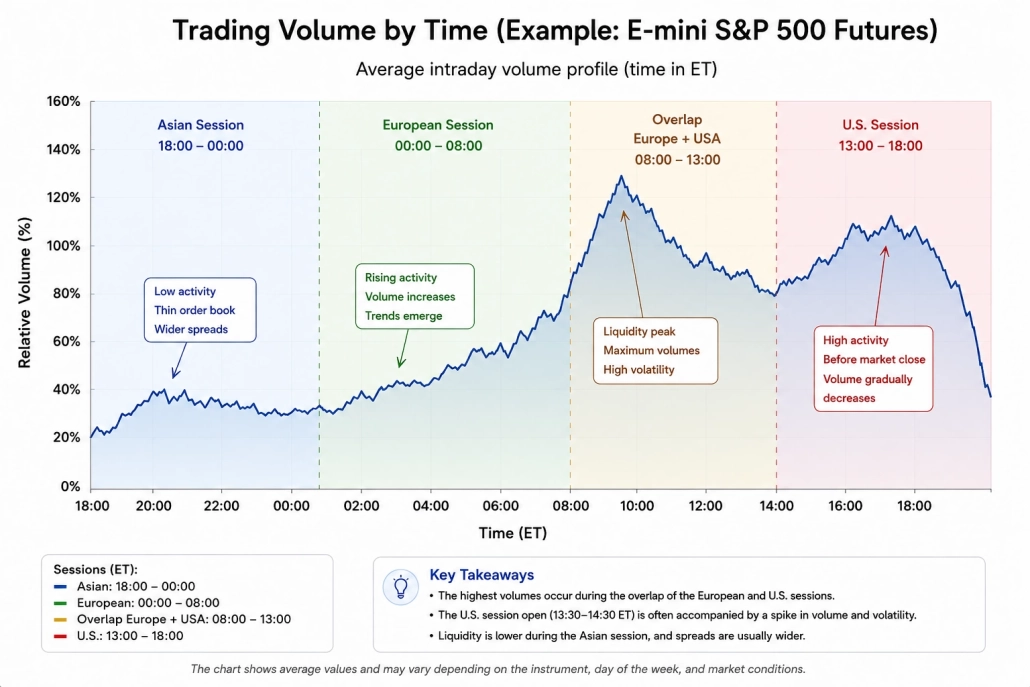
Trading volume often follows a U-shaped pattern throughout the day: relatively high at the beginning of the session, lower around the middle, and rising again toward the close. This is not a universal rule, however, as the distribution of volume depends on the instrument, day of the week, and specific market conditions.
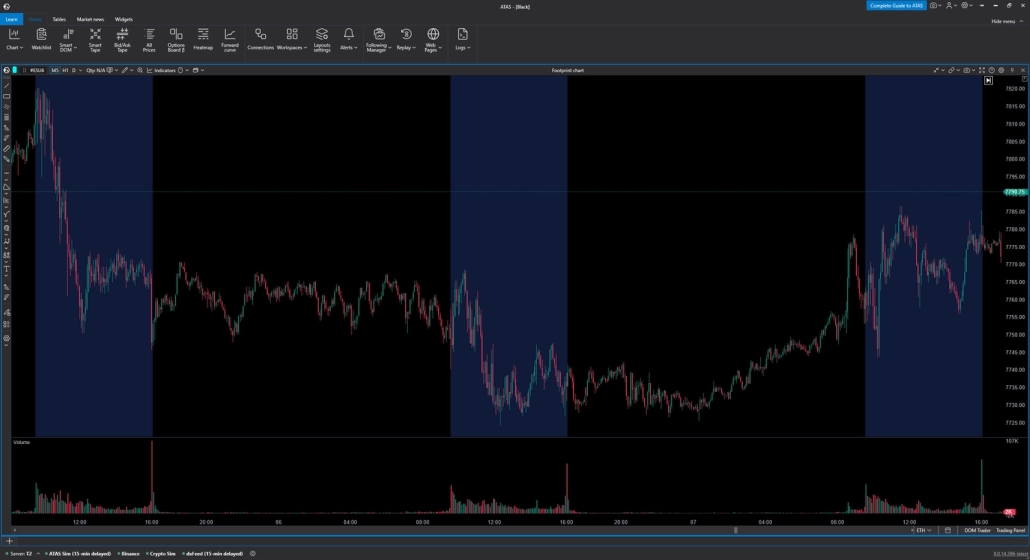
In ATAS, Session Volume Profile allows traders to divide the trading day into separate sessions and see exactly where volume was concentrated. This analysis makes it possible to compare periods of activity not only by time but also by how trades were distributed across the price range.
How Order Flow Changes Across Trading Sessions
The same market can look very different depending on the time of day. It is not only the volume that changes, but also the way buyers and sellers interact.
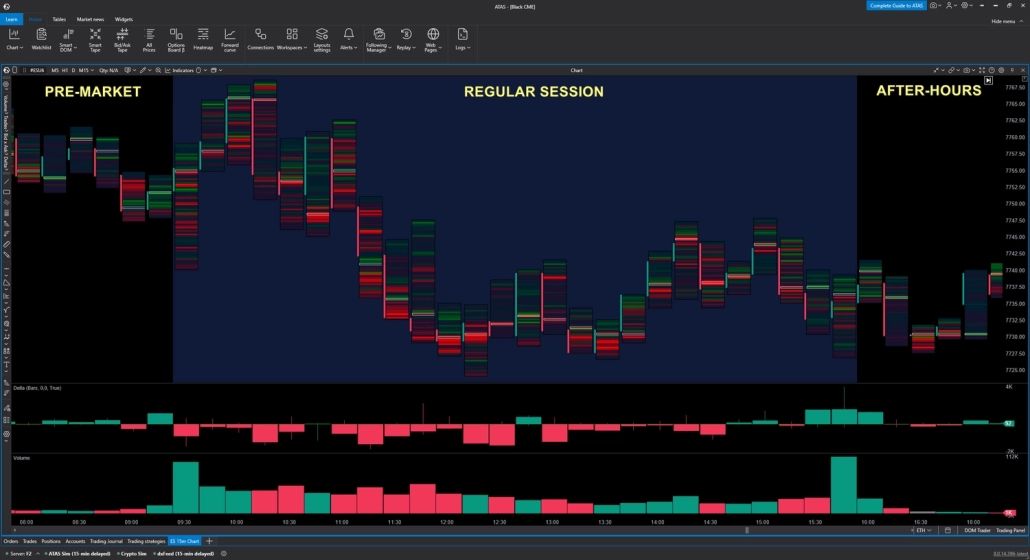
The E-mini S&P 500 (ES) futures contract provides a clear example of the differences between three periods:
- Pre-market — before 9:30 AM ET. Trading volume is relatively low, and Delta values are generally smaller across most bars. Price can move on a smaller flow of trades.
- Regular session — 9:30 AM–4:00 PM ET. Once the regular session opens, volume increases significantly. The chart shows larger Volume bars and more pronounced positive and negative Delta values, reflecting a much more active flow of aggressive trades.
- After-hours — after 4:00 PM ET. Volume typically drops quickly, and Delta returns to smaller values. However, isolated spikes can still occur, for example, following important news or a sharp price move.
Best Time to Trade Futures
For futures traders, it is important to consider not only the Globex schedule but also the periods when market participation and activity change throughout the day.
- 6:00 PM ET — the start of a new Globex trading session after the daily maintenance break. For ES, trading on CME Globex runs from 6:00 PM to 5:00 PM ET the following day.
- 9:30 AM ET — the opening of the main US stock market session. For index futures, this is one of the key points of the trading day: once stocks open, volume, liquidity, and volatility often change significantly.
- 9:30–10:30 AM ET — the first hour of the regular session, which many traders use to define the Initial Balance, the initial range of market movement. This is an analytical approach, not a separate exchange trading session.
- 4:00 PM ET — the close of the regular US stock market session. For ES, this is an important reference point for analyzing daily activity, volume, and VWAP, but the futures contract does not close at this time and continues trading on Globex.
There is no universally “best” hour for every strategy. The optimal trading window depends on the instrument, liquidity, and analytical approach.
Risks and Rules of Trading Outside Regular Hours
Trading ES outside the regular US stock market session makes it possible to react to news and changes in market expectations, but trading conditions can differ significantly from those between 9:30 AM and 4:00 PM ET. When activity declines, market depth can decrease, and individual orders may have a greater impact on price.
Wider Spreads, Volatility & Gaps in Extended Hours
During less active periods, there are typically fewer orders in the order book. As a result, the spread between the best bid and ask can widen, and a relatively large order can have a greater impact on price.
When important news is released, the situation can be the opposite: even during less active hours, order flow can increase sharply, resulting in spikes in both volume and volatility.
When analyzing trading outside the regular session, it is therefore important to look beyond price and consider market depth, liquidity, and order flow. In ATAS, Smart DOM and Heatmap can be used to analyze current order-book liquidity and how it changes over time. When analyzing trading outside the regular session, it is important to look beyond price and consider market depth, liquidity, and order flow. Order flow software for traders can help visualize these changes and better understand how buying and selling activity develops across different market conditions.
Limit Orders vs. Market Orders in Extended Hours
In lower-liquidity conditions, the choice of order type becomes particularly important. A market order is executed at the prices available in the order book, so when market depth is limited, the final execution price may be worse than expected.
A limit order allows you to specify the maximum price you are willing to pay when buying or the minimum price you are willing to accept when selling. This provides greater control over the execution price, but does not guarantee that the order will be filled.
Before placing an order, assess the current liquidity in the order book. In ATAS, Smart DOM and Smart Tape can be used to analyze resting orders and the flow of executed trades.
Practical tip
When trading outside the regular session, it is especially important to monitor not only the direction of the trade but also the execution conditions. In low-liquidity environments, a limit order provides greater control over the execution price, while a market order may be filled at a less favorable price.
Exchange Hours vs. Broker Hours
An exchange’s trading schedule does not always match the hours during which you can trade an instrument through a specific broker. A broker may restrict access to pre-market and after-hours trading, so before placing a trade, check both schedules: the exchange’s official trading hours and your broker’s trading conditions.
In ATAS, you can configure the chart’s time zone and trading sessions to match the market you are analyzing. To review historical scenarios, you can also use Market Replay to replay market data within a specified time range.
Daylight Saving Time & Trading Hours
The transition between daylight saving and standard time temporarily changes the time difference between the US and Europe. In 2026, the US switches to daylight saving time on March 8 and returns to standard time on November 1. In the EU, the changes occur later, on March 29 and October 25.
This matters to traders because during the periods between the US and European clock changes, the schedule of US markets shifts by one hour relative to UTC and European time.
In the US, daylight saving time is in effect from March 8 through November 1, 2026. Under the current EU rules, the transition takes place on the last Sunday of March and the last Sunday of October; in 2026, these dates are March 29 and October 25.
Practical takeaway
When converting exchange schedules from ET to UTC or European time, always account for the current daylight saving status. Otherwise, the familiar market opening time may temporarily appear one hour earlier or later in your local time.
Related Topics
If you want to take a deeper look at what happens inside a trading session, check out ATAS materials on Order Flow, Footprint, and Volume Profile. These resources can help you move from simply tracking trading hours to analyzing volume, liquidity, and participant behavior.
- Session Volume Profile: How to Set It Up and Use It in Trading
- Multiple Time Frames: How to Use Them in Trading
Information in this article cannot be perceived as a call for investing or buying/selling of any asset on the exchange. All situations, discussed in the article, are provided with the purpose of getting acquainted with the functionality and advantages of the ATAS platform.
Subscribe
Get the latest ATAS news delivered conveniently