Stock Analysis
Software for Traders

ATAS is advanced stock analysis software for those who want to see the volume and order flow behind the price, not just candles. Get a set of analytical tools developed by traders, for traders, to see where genuine buying and selling activity shows up in the order flow, where big orders rest, and how liquidity shifts in real time.

Try ATAS for Free

GOOG · NVDA · TSLA · AAPL · and more
What Is Stock
Analysis
Software?

It’s an analytical platform that helps you research, track, and evaluate a stock using price, volume, and order flow data to make informed decisions about when and whether to act. Most tools built for stock analysis cover just one layer of that picture — usually price, through charts and indicators for reviewing history.

A more complete approach combines three layers instead: fundamental context, technical structure, and the real supply, demand, and liquidity behind each move.

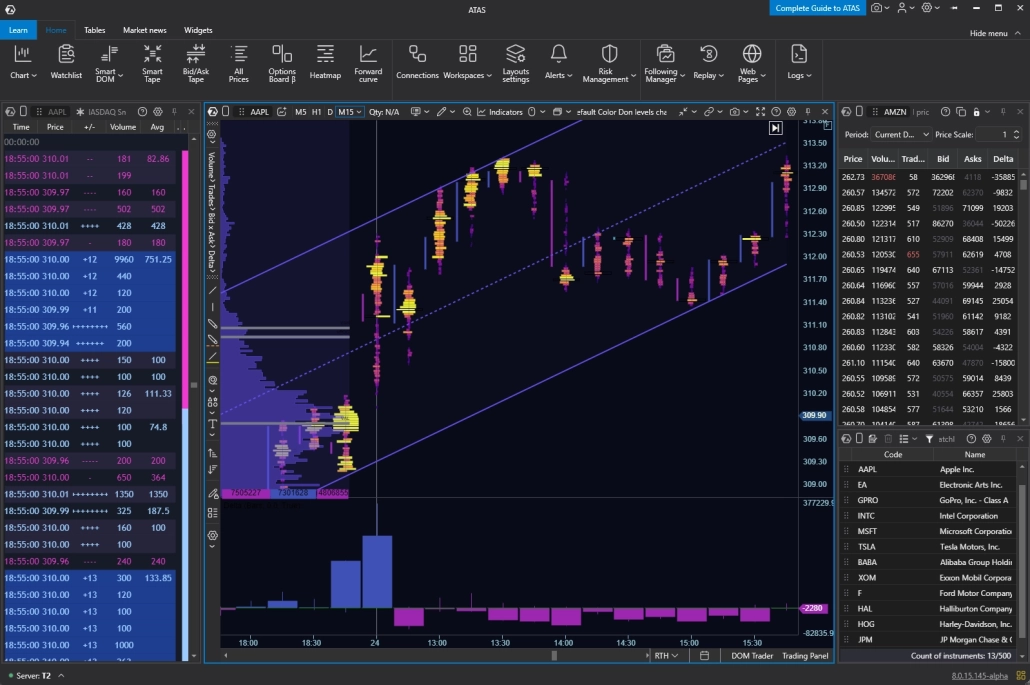
ATAS is built around all three. It’s an advanced stock analysis tool that brings fundamental, technical, and volume/order flow data together in one workspace — with a deliberate focus on the third: what’s actually happening in the order book while the price prints.

What Is Stock Analysis Software

Volume vs Technical vs Fundamental Analysis

With ATAS, you don't have to limit yourself to only one type of analysis. Order flow is the core: the order book, footprint, and liquidity data that most charting tools leave out entirely. Around that core, 240+ customizable indicators cover classic technical analysis — VWAP, moving averages, oscillators, and more. A built-in Market News widget keeps earnings and news headlines in view on the same screen, without turning fundamentals into a dedicated analysis layer.

Fundamental analysis
Technical analysis
Volume / Order Flow
What it evaluates
Company and macro news, earnings
Price structure, trend, momentum, key levels
Real supply, demand, and liquidity behind each price move — who’s trading, where, and at what size
How ATAS covers it
Built-in Watchlist and Market News widget
240+ indicators: VWAP, moving averages, Bollinger Bands, Ichimoku, custom indicators
Footprint, DOM, Cluster Statistics, Delta/CVD, Smart Tape, Big Trades and more
Analytical role
Background reference — headlines on the chart, not a dedicated analysis module
Secondary layer — confirms or challenges what order flow shows
Core layer — primary lens for reading the auction

The Fragmentation of
the US Stock Market

The US stock market isn’t limited to one exchange. Stocks are divided across the NYSE, NASDAQ, BATS, and a web of ECNs. A fragmented market means fragmented liquidity, and most standard research tools fail to show a complete picture. To see real supply and demand, you need stock analysis software that aggregates the market data into a consolidated view.

Venue coverage depends on the data feed you connect — see “Institutional Data Feeds” below.

Five Layers
Classic Charts Don’t Show

01

The Tape

who is executing right now

02

Block Trades

where the size actually printed

03

Inside the Candle

how volume split between buyers and sellers

04

Value Areas

which levels the market accepted

05

Pressure Over Time

whether buying is building or fading

How ATAS Works: The Pillars of Deep Stock Analysis

If you want to go beyond basic technical analysis, you need to look directly at the auction process. Our stock analysis tool offers dedicated modules for tracking large-player activity and volume footprints in a stock.

Layer 1 — The Tape:
Genuine Prints, Not Split Volume

On a standard volume bar, 500 shares traded looks the same whether it was one institutional order or 500 separate 1-share retail orders. The bar only tells you the total — it doesn’t tell you how that total was assembled.

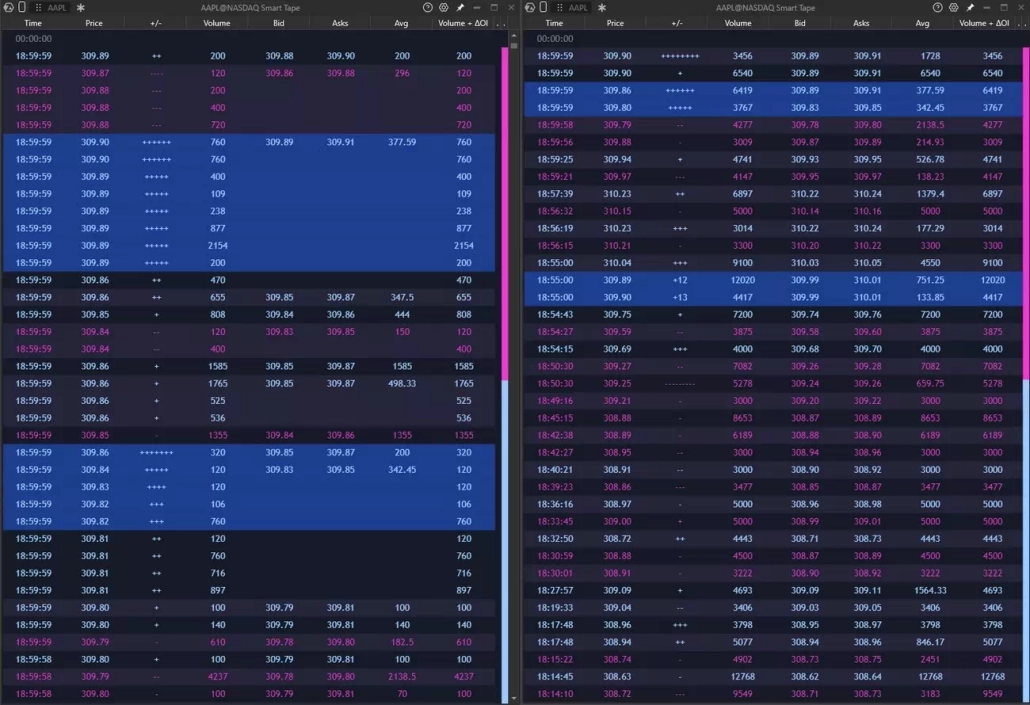
Smart Tape removes that ambiguity. It shows every execution as a separate print, in the exact order it happened, without merging small trades together or splitting a large one apart. Each line on the tape is one real trade — nothing more, nothing less.

You see the exact size of each execution, the price it hit, and which side of the spread paid to get filled. That last part matters: it tells you whether the buyer was aggressive enough to lift the offer, or the seller pushed through the bid — the kind of detail a volume bar alone can’t show.

Put together, that’s the difference between a real block trade and a hundred retail clicks that would otherwise look identical on a chart.

Layer 1 — The Tape

Layer 2 — Block Trades:
Where Size Left Its Mark

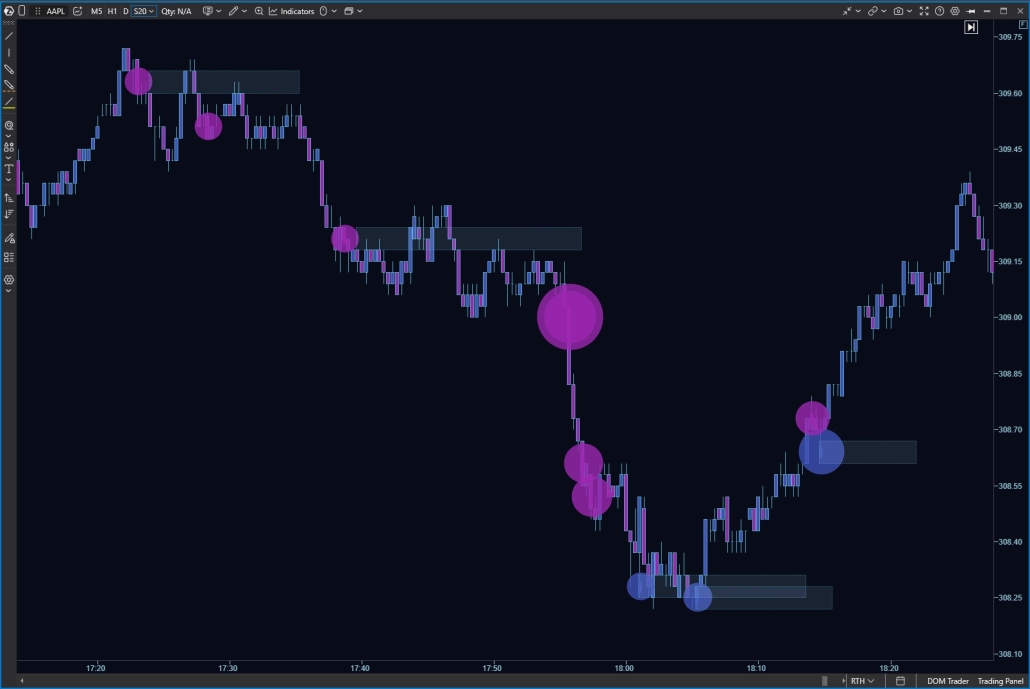
Say most trades that hour were under 500 shares, and then a single 50,000-share order prints. On a standard chart, that’s one bar among hundreds — nothing marks it as different from the bars around it, so it’s easy to miss entirely.

Big Trades and Big Trades Adaptive flag executions like that automatically as they happen. You don’t have to watch the tape line by line waiting for something large to print — the tools do that scanning for you and mark the exact price where the trade went through.

Adaptive adjusts the size threshold to the stock and the session instead of using one fixed number — so what counts as “large” scales with how that particular stock actually trades.

Layer 2 — Block Trades

Layer 3 — Inside the Candle:
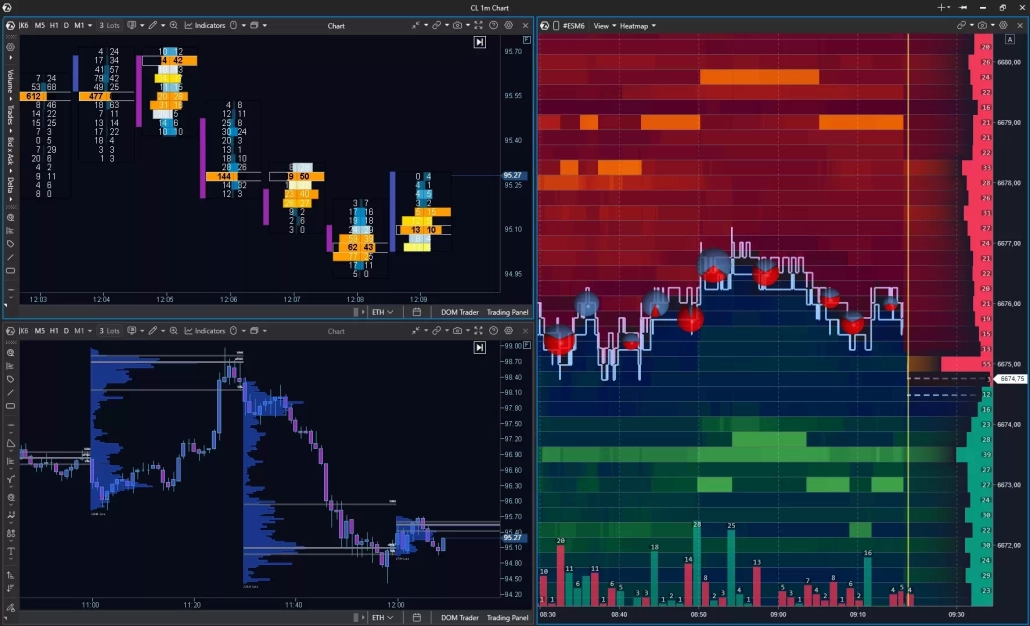
Footprint and Cluster Indicators

On a standard chart, a candle shows open, high, low, and close, and the volume bar below it adds a total — say, 10,000 shares while the stock moved from $50.00 to $50.20. Neither shows how that volume split by price or by side.

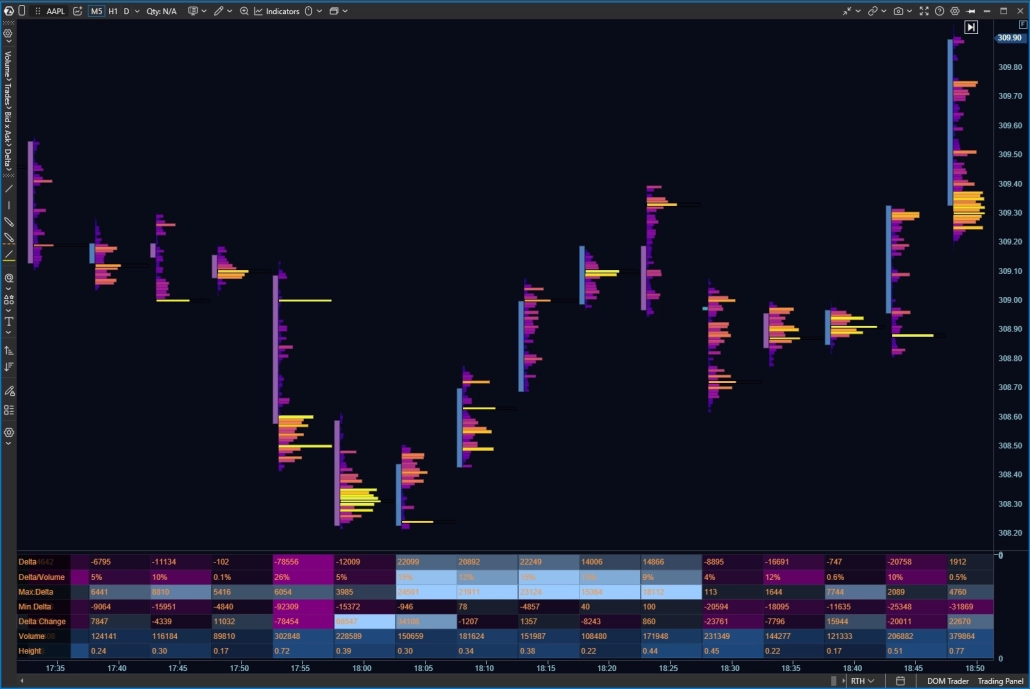
Footprint opens the same candle into a ladder of executions, price level by price level, showing where the volume sat and who was aggressive at each price.

  • Cluster Statistics summarizes each bar underneath it — volume, delta, trades, bar height — so you read the shape of the move at a glance.
  • Stacked Imbalance flags consecutive price levels where aggressive orders on one side outnumber resting orders on the other — several in a row marks real conviction, not noise.
  • Cluster Search filters the whole session for that kind of activity — volume spikes, delta spikes, imbalances — instead of scrolling bar by bar.
Layer 3 — Inside the Candle

ATAS gives 400+ cluster variations, and works on standard time bars as well as reversal and volume-based bars — the same stock, read at the resolution you need.

Layer 4 — Value Areas:
The Levels the Market Accepted

Say a stock spends most of a session trading in a tight range, then briefly spikes higher before dropping back. On a standard candle chart, that spike looks just as significant as everything else — a tall wick, same visual weight as the rest of the session.

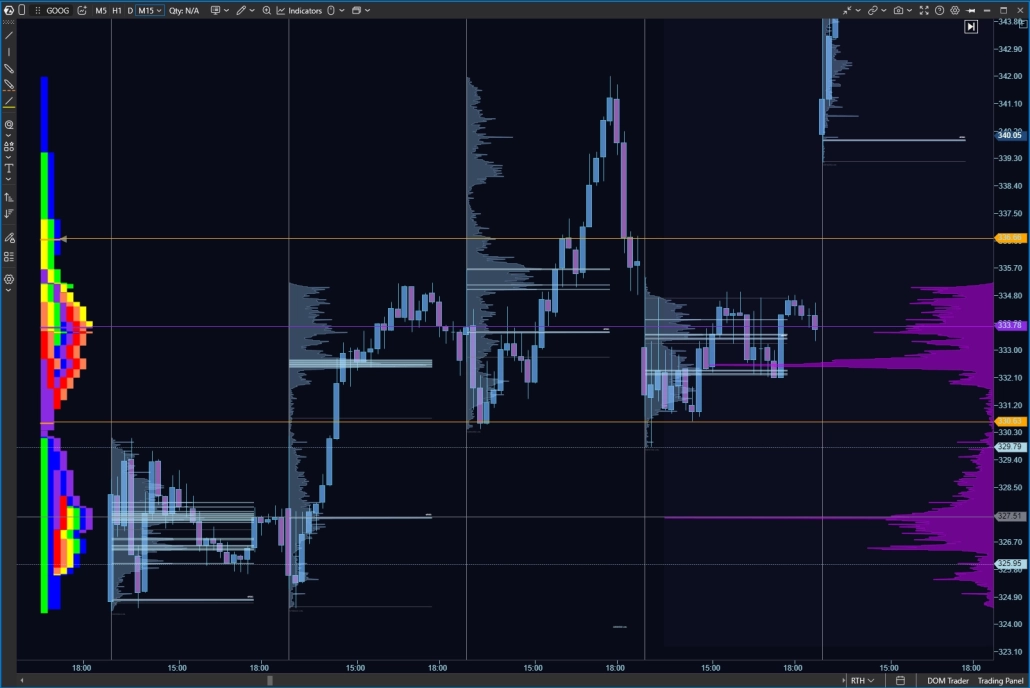
Volume Profile shows the difference. Instead of plotting price against time, it plots price against volume, turning the session on its side to reveal exactly where the most shares actually changed hands. The range where the stock sat for hours builds a tall shelf on the profile; the brief spike barely registers, because almost nothing traded there.

Those high-volume shelves tend to act as support and resistance going forward — that’s where the most participants already agreed the price was fair. The value area marks the core range the market accepted, so you can see the boundaries at a glance instead of reading every price level by hand.

Layer 4 — Value Areas

Session by session, this builds a record of where positions were actually built — and where the market visited but refused to stay.

Layer 5 — Pressure Over Time:
Delta and CVD

A stock can sit flat for an hour while, underneath, buyers are aggressively lifting the offer the entire time — or sellers are quietly unloading into every small uptick. A candle chart won’t show you which. Flat price could mean nothing is happening, or it could mean two sides are fighting to a standstill.

Delta shows that balance directly: the difference between aggressive buying and aggressive selling in each bar, not just how many shares traded.

Cumulative Volume Delta (CVD) stacks that balance across the session, turning bar-by-bar pressure into a running total you can read as a trend of its own.

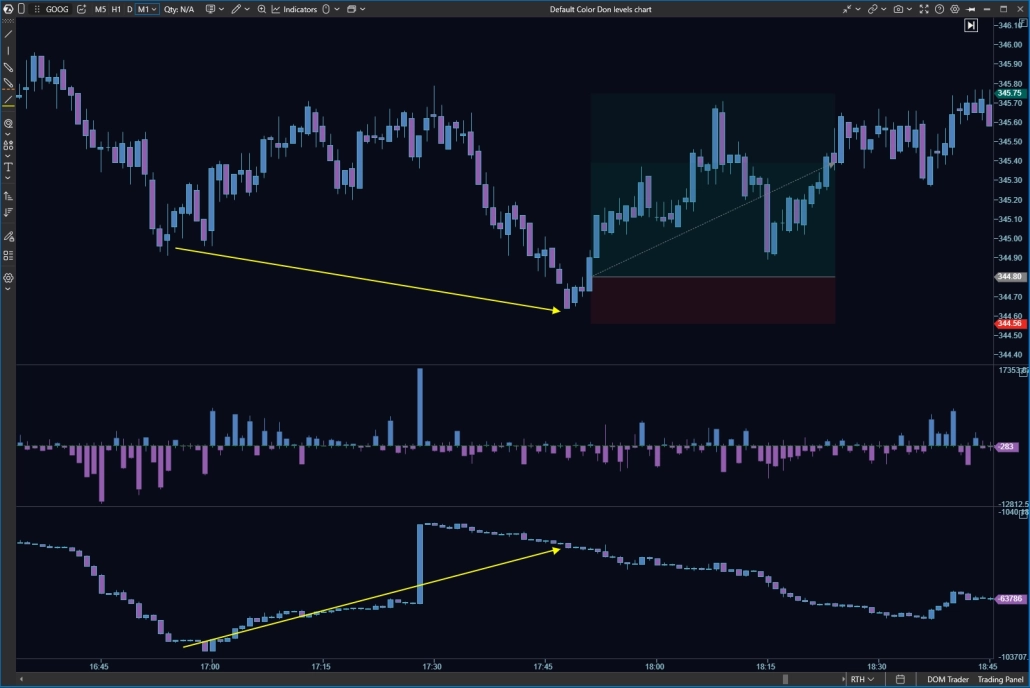
That running total is where it gets useful. If price stays flat while CVD keeps climbing, buyers are building a position underneath a chart that looks like nothing is happening. If price grinds higher while CVD is falling, the move is running on thinner participation than the chart suggests — worth a closer look before you take the breakout at face value.

Layer 5 — Pressure Over Time

Delta, bar by bar. Before the cumulative view there is the simple one: a Delta panel that says, for each bar, which side paid the spread.

Stock Technical Analysis Software: 240+ Indicators

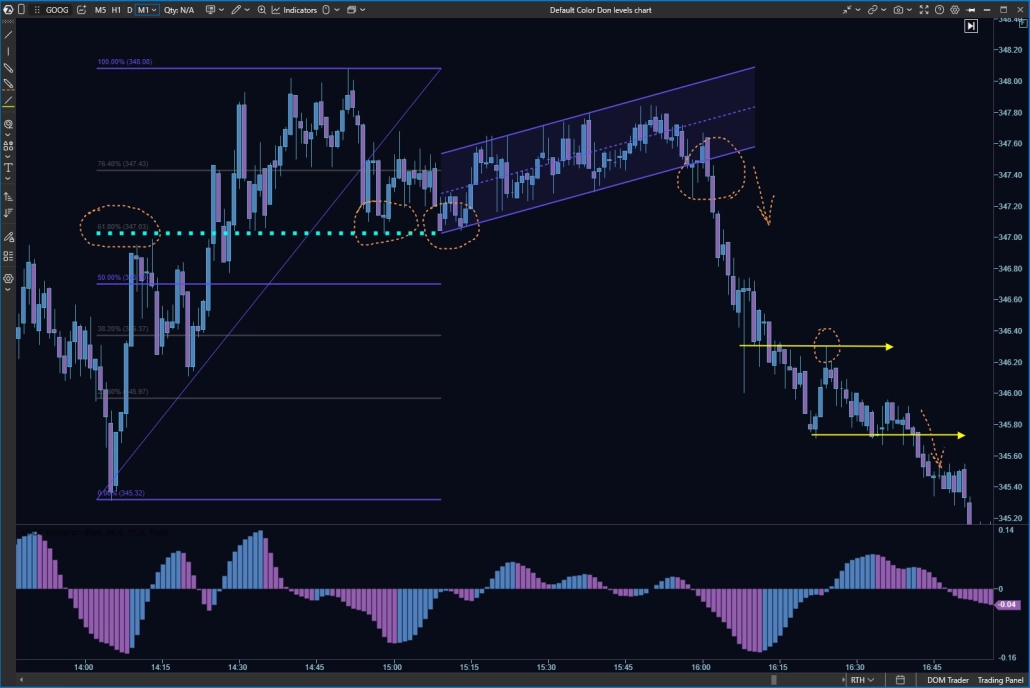
ATAS is not limited to order flow — it's a comprehensive stock technical analysis software solution where technical charting sits beside volume data. It features over 240 indicators and the ability to connect custom ones. Run VWAP, EMA, Bollinger Bands, and Ichimoku next to delta, CVD, and cluster data on one screen. These advanced technical analysis tools help you confirm a textbook setup with what the flow is doing — a layer of context that price-only charting doesn't offer.

Stock Technical Analysis Indicators

Fundamental Analysis: The Why Behind the Move

Order Flow shows what is happening in the order book right now. Technical indicators help reveal the structure that has developed over time. But on their own, they do not always explain why a stock suddenly started moving.

The reason could be an earnings report, a change in company guidance, a Fed decision, a macroeconomic release, or a new analyst rating. ATAS helps keep this context close to the chart: see the event, get the news, spot the reaction of a specific stock, and then examine it through Order Flow.

RSS Reader
RSS Reader

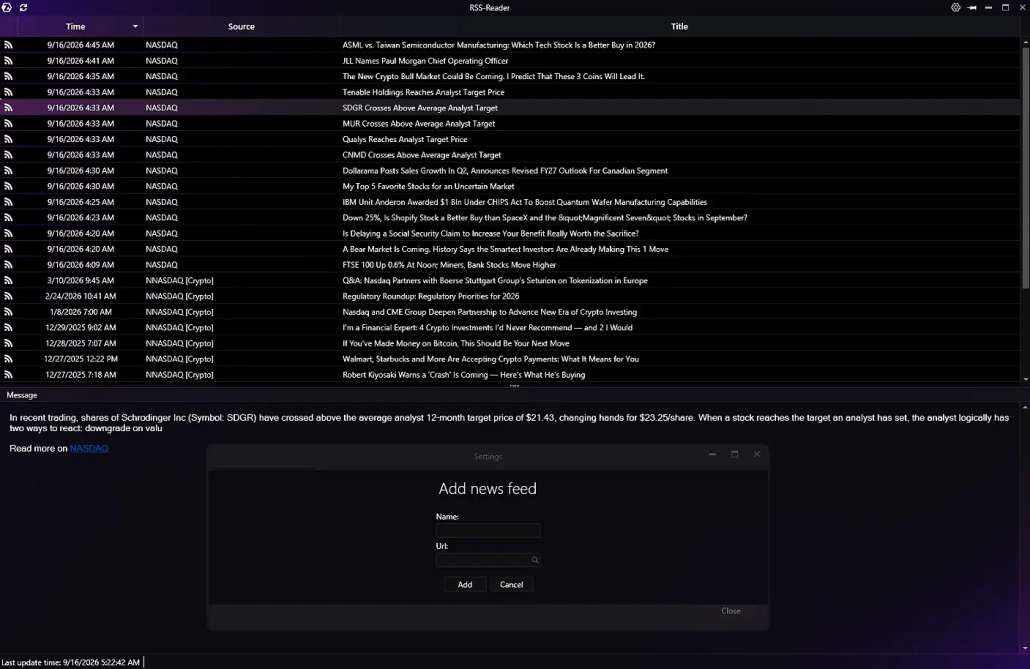
Every trader has their own set of sources: news about specific companies, industry publications, exchanges, or specialized resources. RSS Reader lets you bring these sources directly into ATAS.

You can add your own RSS feeds and receive news updates in one window without opening separate websites or tabs. If needed, you can open the news item in the original source and explore it in more detail.

This is useful if you follow a specific sector or group of companies and want to keep the sources that matter to your analysis close at hand.

RSS Reader adds another layer of context: you decide which information flows you want to see alongside the chart.

News
Market News

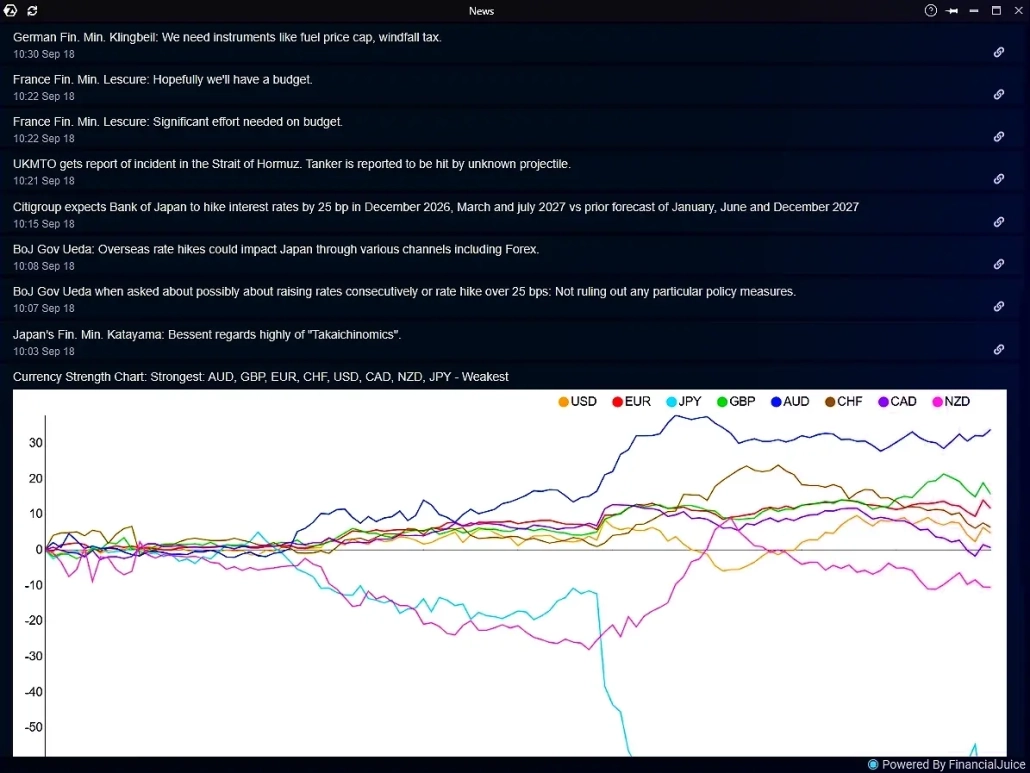
A sharp price move or spike in volume often begins before a trader has time to understand what happened. The News module imports real-time data from the financial portal financialjuice.com and helps connect asset movements with specific news events more quickly.

The module displays company and market news directly inside ATAS. You can follow headlines in real time and open the full story when you need more information about an event.

It is especially useful when a stock suddenly moves outside its usual range or volume rises sharply. Instead of switching between the chart and external news websites, you can immediately check whether a new corporate or market factor has appeared.

The News module does not replace full fundamental analysis, but it helps answer the first question faster: what could have triggered this move?

Economic Calendar
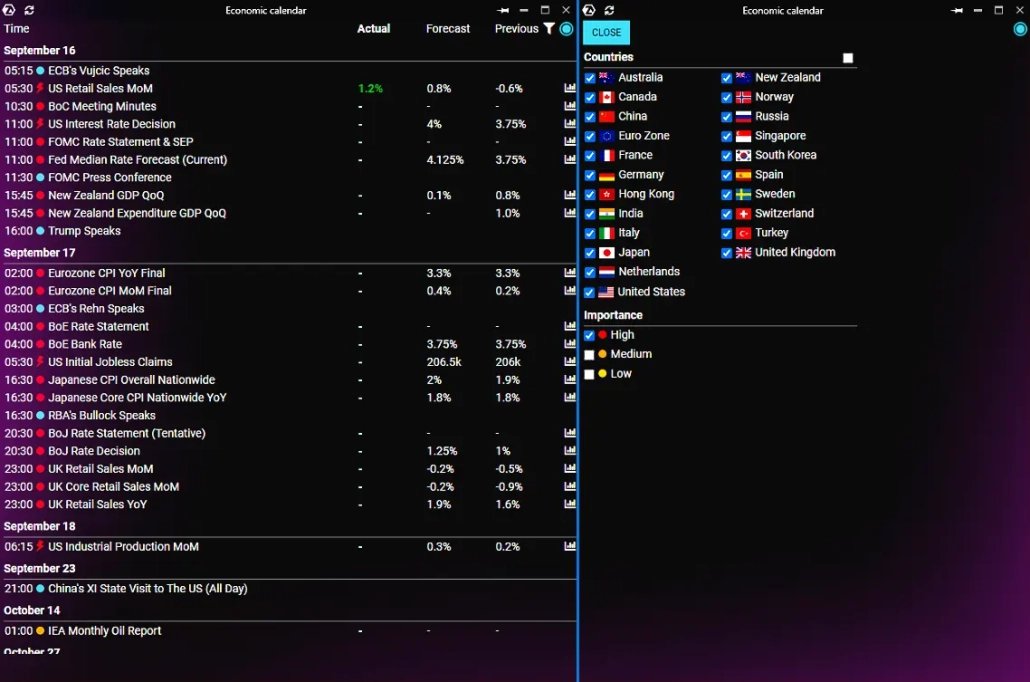
Economic Calendar

Not every move starts with news about a specific company. CPI, interest-rate decisions, labor-market data, and other macroeconomic events can affect entire groups of stocks and the broader market at the same time.

Economic Calendar provides a concise summary from the financial portal financialjuice.com. The module shows scheduled releases, publication times, previous values, forecasts, and actual results after release. Events can be filtered by country and importance.

This calendar helps you understand in advance when additional market volatility may appear. It is useful both for preparing for a session and for reviewing a move that has already happened.

If several stocks begin reacting at the same time, Economic Calendar helps you quickly check whether a broader macroeconomic event was behind the move.

Institutional Data Feeds and Brokerage Integrations

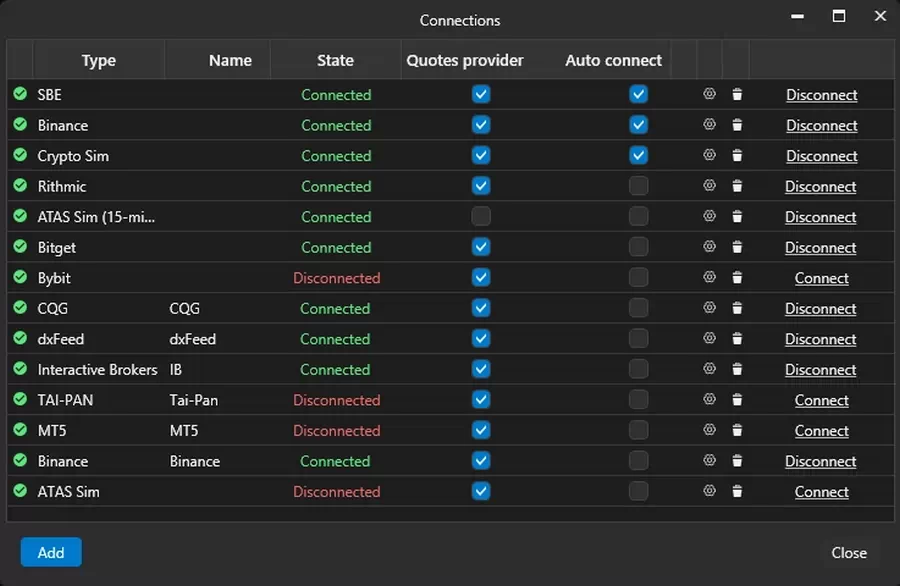
Good analysis needs good data. ATAS is a tool for stock analysis, but your market data comes through a separate connection you control. You can get information from professional feeds, with three connections doing most of the work for stocks:

Connection
What it delivers
dxFeed
Consolidated US equities data via CTA/UTP, with Level II depth from Nasdaq TotalView, NYSE Arca, and other venue
IQFeed
Broad coverage across US futures and equities (NYSE, NASDAQ, AMEX) through a single client feed
Tai Pan
Data for NASDAQ and NYSE alongside European futures, via a direct integration built for retail and active traders
Interactive Brokers
Connect your own IBKR account via TWS for direct access to US equities — note that IBKR doesn’t transmit trade direction, so ATAS derives it from bid/ask

How to Start Analyzing Stocks with ATAS

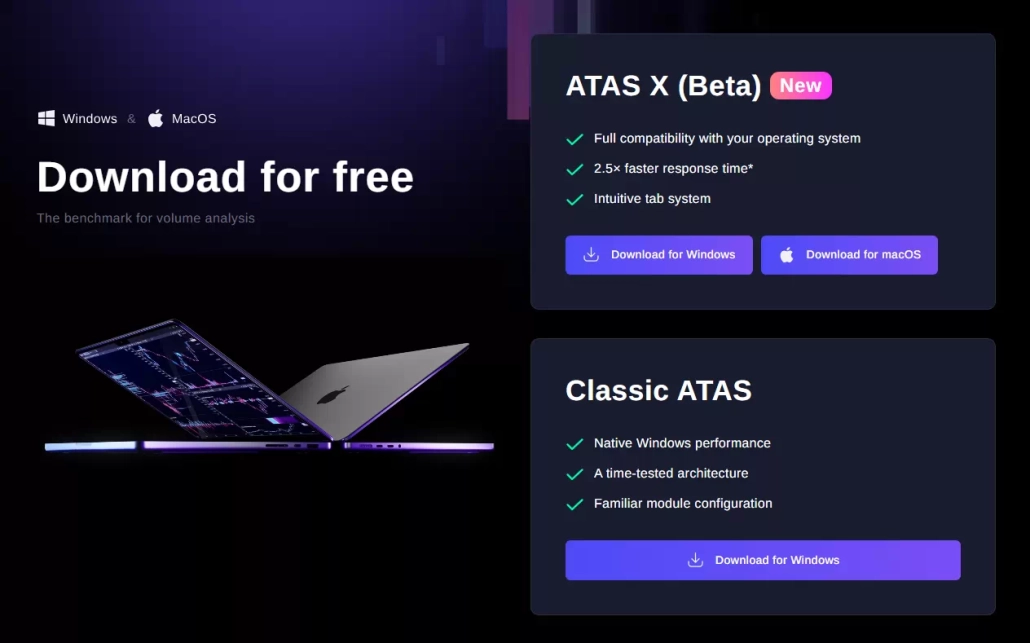
Download and Install Stock Analysis Software
Connect Your Data and Account
Set Up Your Workspace in ATAS
Practice with Replay
Manage Orders Within the Same Interface

Setup takes just a few minutes. Follow these steps:

  • Download ATAS, run the installer, and launch the app.

  • Link your broker or data feed to the stock analysis software by API so quotes and depth start flowing in.

  • Open a chart for your asset, add the indicators and modules you need, or use a template to start analyzing the stock.

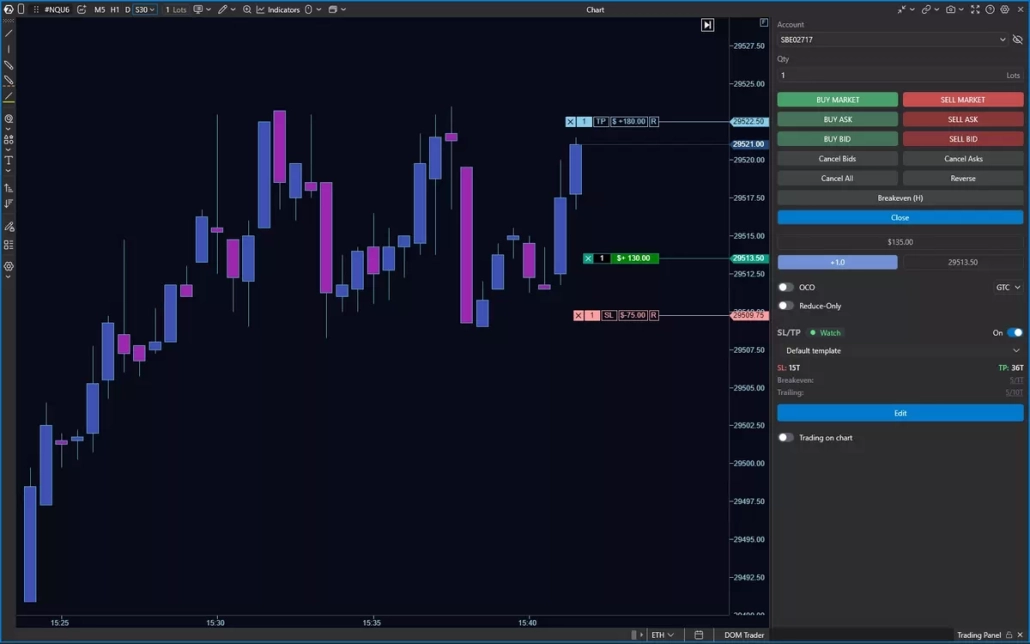
  • Before risking capital, replay past sessions to test how you read flow. Note: The feature is available to paid accounts (including free trials). Check our pricing details.

  • Send the order to your connected broker directly from the chart or DOM. The order is routed to your brokerage account, and the broker handles the actual execution. See how it works in more detail.

FAQ

  • This is a type of software that helps you study a stock through different market analyst data, such as price, volume, and order flow. ATAS focuses on the volume side: the order book, footprint, and liquidity, which standard charts often leave out.

  • Most of the time, a stock market analysis tool relies on historical data and lagging indicators. ATAS’s stock chart analysis software adds real order flow, market depth, and volume at every price.

  • Fundamental analysis asks what to trade; it looks at earnings, news, and company health. Technical analysis asks where; it reads price structure and levels. Volume and order flow, the ATAS focus, helps you see where large orders are active around those levels.

  • Order flow analysis tracks the limit orders resting in the book and market orders hitting them. Using order flow for stocks means watching delta, absorption, and large prints — activity in the order book that a price chart only shows you after the fact.

Trustpilot

360,000+ traders gained an market edge with ATAS

Davood Talefirouz

TR

Feb 26, 2026

I am fully satisfied with the ATAS…

I am fully satisfied with the ATAS customer service. Their support team responded to all my requests promptly and followed through until every issue was completely resolved. Professional, patient, and very reliable support. Highly recommended.

Lionel Boontang

AU

Apr 29, 2026

Good constant communication with…

Good constant communication with resolving issue and recommended solutions

Luca

RO

Mar 3, 2026

Amazing software

Amazing software, amazing support and amazing community !How ATAS X works on MacOS, so fluidly with that massive amount of market depth data... I don't how that's even possible...Only ATAS team could pull off such a miracle ! Thank you so much for all that effort and keep the good work !

Daniel Mota

US

Jun 5, 2026

I love the volume profiles

I love the volume profiles, market profiles, heatmaps, customization. It would also be nice to have more candlestick history load on the smaller minute timeframes. This company is also doing great with their tutorials on YouTube. Keep it up!

Gregory

US

Nov 20, 2025

Great software suite for trading…

Great software suite for trading proffesionals. Looking forward to many additional years and continuous instantaneous support along with outstanding orderflow tools.

Adam Warner

US

Apr 29, 2026

These guys are great

These guys are great! They walk you through the process with pictures and diagrams. Just simply amazing team and an amazing product that keeps improving.

CSmarket lopez

ES

Jun 15, 2026

I've been using ATAS for several years

I've been using ATAS for several years, and it has become the core tool of my trading. I mainly trade using volume profiles and order flow, and I honestly can't imagine my trading without it.What I value most is that it allowed me to see the market from a completely different perspective. ATAS didn't make me profitable, but it provided the tools I needed to develop a methodology that eventually helped me achieve consistent results.For traders who rely on order flow analysis, it's a platform that's very difficult to replace. I'm extremely satisfied with my experience and would highly recommend it.

Peter

BG

May 12, 2026

Reliable and patient technical support

I have been using ATAS for my trading for some time now and recently reached out to their online support for help with a technical setup. The team was incredibly patient and provided clear, direct solutions that got me back on track quickly. I highly appreciate working with a company that employs knowledgeable people who truly understand their software rather than just sending automated replies. Overall, I am genuinely grateful for their help and feel much more confident using the platform knowing this level of support is available.

Erkan Karakoc

DE

Apr 29, 2026

Best Orderflow and analysing Tool

Best Orderflow and analysing Tool for Futures Trading

Samuel

US

Apr 26, 2026

All in one tool

All in one tool, best orderflow platform out currently especially with the new 3D heatmap no other software I used before comes even close. Not even bookmap or deepchart.Samuel B

In the Press:
See the Market
Behind the Price

Download ATAS and build your first footprint workspace today. Learn the functionality with our free plan, or test the complete toolsets in a 14-day free trial.

Get Started with ATAS for Free